Every cloud workload relies on networking to connect users, applications, services, and data. Applications need to connect users, services, APIs, databases, cloud environments, on-premises systems, and external partners. Some workloads need public internet access. Some need private connectivity.
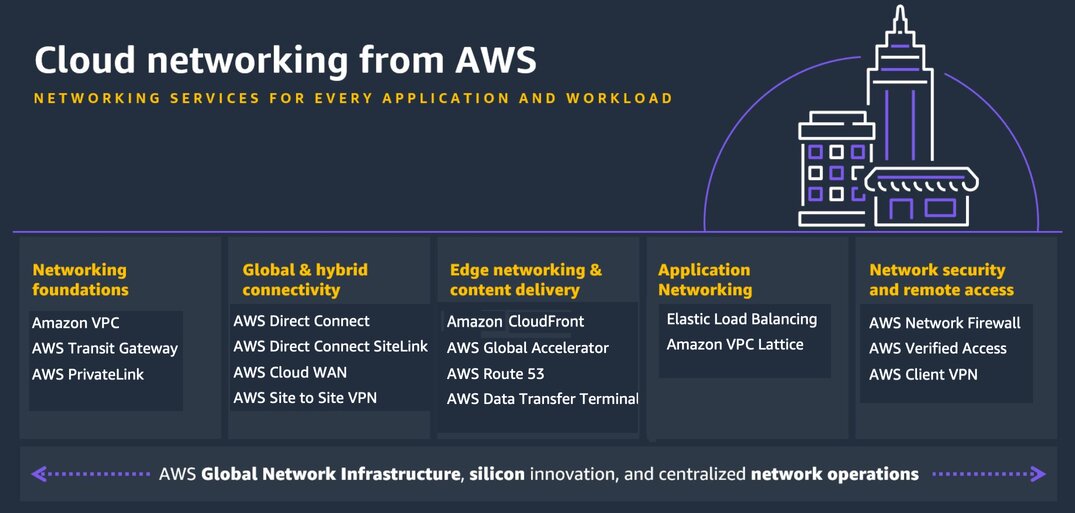
AWS provides networking and content delivery services across categories such as networking foundations, global and hybrid connectivity, edge networking and content delivery, and application networking.
AWS Networking services include: Amazon VPC, AWS Transit Gateway, AWS PrivateLink, Amazon CloudFront, AWS Global Accelerator, Amazon Route 53, Amazon API Gateway, Amazon VPC Lattice, Elastic Load Balancing, AWS WAF, AWS Shield, and AWS Network Firewall.
For SMEs, the goal is not to use the most advanced networking service. The goal is to choose services that align with the workload’s connectivity, performance, security, availability, and operational needs.
Why networking and content delivery decisions matter
Networking decisions shape how users reach your applications, how services communicate, how traffic is secured, and how reliably workloads perform. The wrong networking choice can create latency, exposure, complexity, troubleshooting gaps, and unexpected cost. The right networking design can improve availability, reduce risk, support growth, and create a stronger foundation for cloud modernization.
Networking and content delivery decisions affect:
- Application availability
- User experience and latency
- Security and segmentation
- Hybrid connectivity
- DNS and routing
- Scalability
- DDoS and web protection
- Private access to services
- Data transfer cost
- Troubleshooting and visibility
Start with the traffic pattern, not the service name
Before choosing an AWS networking or content delivery service, ask:
- Is the workload public-facing, private, or hybrid?
- How do users reach the application?
- Does the workload need DNS routing, CDN, load balancing, or global acceleration?
- Does traffic need to stay private?
- Are multiple VPCs, accounts, or regions involved?
- Does the organization need connectivity to on-premises systems?
- Does the application need protection at the web layer, network layer, or both?
- What latency and availability requirements exist?
- How will traffic be monitored and troubleshot?
- What are the data transfer and operational cost implications?
The better question is not simply, “Which AWS networking service should we use?” The better question is, “How does traffic need to enter, move through, and leave this workload?”
Main AWS networking and content delivery service options
| Workload Need | AWS Service |
|---|---|
| Foundational cloud networking | Amazon VPC |
| DNS and domain routing | Amazon Route 53 |
| Load balancing | Elastic Load Balancing |
| Content delivery and CDN | Amazon CloudFront |
| Global traffic acceleration | AWS Global Accelerator |
| Multi-VPC and hybrid network hub | AWS Transit Gateway |
| Private service access | AWS PrivateLink |
| Dedicated hybrid connectivity | AWS Direct Connect |
| Encrypted hybrid connectivity | AWS Site-to-Site VPN |
| Remote user VPN access | AWS Client VPN |
| Service-to-service networking | Amazon VPC Lattice |
| API front door and API traffic management | Amazon API Gateway |
| Web application protection | AWS WAF |
| DDoS protection | AWS Shield |
| Network firewall and traffic inspection | AWS Network Firewall |
| IP address governance | Amazon VPC IP Address Manager |
| Network visibility and troubleshooting | VPC Flow Logs / Traffic Mirroring / CloudWatch |
Amazon VPC: foundational cloud networking
Amazon Virtual Private Cloud (Amazon VPC) is a service that lets you run your AWS resources in a safe, private, and isolated virtual network. Key components include subnets, route tables, and gateways.
With Amazon Virtual Private Cloud (Amazon VPC), you can launch AWS resources in a logically isolated virtual network that you’ve defined. This virtual network closely resembles a traditional network that you’d operate in your own data center, with the benefits of using the scalable infrastructure of AWS.
Amazon Route 53: DNS and domain routing
Amazon Route 53 is a highly available and scalable cloud Domain Name System (DNS) web service. It is designed to give developers and businesses an extremely reliable and cost-effective way to route end users to Internet applications by translating names like www.example.com into the numeric IP addresses like 192.0.2.1 that computers use to connect to each other.
Use Route 53 when the workload needs: DNS hosting, Domain routing, Health checks, Failover routing, Latency-based routing, Weighted routing, Private hosted zones, Internal service discovery patterns.
Elastic Load Balancing: distributing application traffic
AWS Elastic Load Balancing (ELB) automatically spreads incoming application traffic across multiple targets like EC2 instances, containers, and IP addresses. It supports Application (ALB), Network (NLB), and Gateway (GWLB) load balancers to deliver high availability, fault tolerance, and automatic scaling.
Use Elastic Load Balancing when the workload needs: High availability, Traffic distribution across instances, containers, or IP targets, Web application load balancing, Internal or external load balancing, Application, network, or gateway load balancing patterns.
Amazon CloudFront: content delivery and edge acceleration
Amazon CloudFront is AWS’s content delivery network service. CloudFront is a fast content delivery network (CDN) service that securely delivers data, videos, applications, and APIs to customers globally with low latency, high transfer speeds, all within a developer-friendly environment.
Use CloudFront when the workload needs: Global content delivery, Lower latency for users, Static website acceleration, API acceleration, Caching, Edge delivery, and integration with AWS WAF for web protection
AWS Global Accelerator: global application performance and availability
AWS Global Accelerator helps improve availability and performance for global applications by routing traffic through AWS’s global network.
Use Global Accelerator when the workload needs: Static anycast IP addresses, Global traffic acceleration, Multi-region routing, Improved availability for internet-facing applications, Faster routing over AWS’s global network.
AWS Transit Gateway: multi-VPC and hybrid network hub
AWS Transit Gateway is a cloud router that connects virtual private clouds (VPCs) and on-premises networks through a central hub. It stops complex peering, handles thousands of connections, and works across different AWS accounts.
Use Transit Gateway when the workload needs: Centralized VPC connectivity, Multi-account networking, Hub-and-spoke architecture, Hybrid network connectivity, Simplified routing across many VPCs, Shared services networking.
AWS PrivateLink: private access to services
AWS PrivateLink is a secure networking technology providing private connectivity between virtual private clouds (VPCs), supported AWS services, and on-premises networks without using the public internet, public IPs, or NAT devices. It relies on interface VPC endpoints and network load balancers to keep all traffic inside the Amazon network.
Use PrivateLink when the workload needs: Private service connectivity, Access to AWS services through private endpoints, SaaS access over private endpoints, Reduced public internet exposure, Provider-consumer service architecture, Private connectivity across VPCs and accounts
PrivateLink is useful when the goal is private point-to-point access to a service without opening broad network connectivity between environments.
AWS Direct Connect: dedicated hybrid connectivity
AWS Direct Connect is a cloud service that links your internal network directly to an AWS data center, bypassing the public internet to give you faster speeds, lower delays, and better security. AWS Direct Connect provides dedicated private connectivity between an organization’s environment and AWS.
Use Direct Connect when the workload needs: a dedicated network connection, predictable network performance, hybrid cloud connectivity, reduced reliance on the public internet and higher bandwidth.
AWS Site-to-Site VPN: encrypted hybrid connectivity
AWS Site-to-Site VPN is a fully-managed service that creates secure, encrypted IPsec connections between your on-premises data center or branch office and your Amazon Virtual Private Cloud (Amazon VPC) or AWS Transit Gateway. AWS Site-to-Site VPN provides encrypted connectivity between on-premises networks and AWS over the internet.
Use Site-to-Site VPN when the workload needs: Encrypted tunnels over the internet, hybrid connectivity, faster setup than dedicated connectivity, backup connectivity for Direct Connect, smaller-scale connectivity needs.
AWS Client VPN: secure remote user access
AWS Client VPN is a fully managed remote access service that lets users securely connect to a Virtual Private Cloud (VPC) or on-premises networks using free desktop software based on the OpenVPN. AWS Client VPN provides secure remote user access to AWS resources.
Use Client VPN when the workload needs: Remote access to private AWS resources, secure access for employees or contractors, centralized remote access management, VPN access without managing traditional VPN appliances.
Amazon VPC Lattice: service-to-service networking
Amazon VPC Lattice is an application networking service that consistently connects, monitors, and secures communications between your services. Amazon VPC Lattice supports service-to-service connectivity across VPCs and accounts.
Use VPC Lattice when the workload needs: Application service networking, Cross-VPC service connectivity, Cross-account service access, Service discovery and routing, Access control for service-to-service communication.
Amazon API Gateway: API front door and traffic management
Amazon API Gateway is a fully managed AWS service that allows developers to create, publish, maintain, monitor, and secure APIs at any scale. It serves as the secure “front door” for applications to access backend services like AWS Lambda, Amazon EC2, containerized workloads, or any publicly accessible HTTP endpoint.
Use API Gateway when the workload needs: API publishing, API traffic control, Authentication and authorization integration, Throttling, Request routing, Serverless backend integration, Backend API integration
AWS WAF: web application protection
AWS WAF is a managed web application firewall service that protects web apps and APIs by filtering and monitoring HTTP(S) requests. It blocks common exploits like SQL injection and cross-site scripting, and integrates with services like Amazon CloudFront and Application Load Balancers.
Use AWS WAF when the workload needs: Protection from common web exploits, Layer 7 filtering, Bot control, Rate limiting, Protection for supported services such as CloudFront, Application Load Balancer, and API Gateway
AWS Shield: Distributed Denial-of-Service (DDoS) Protection
AWS Shield is a managed security service that protects applications on Amazon Web Services (AWS) through two main tiers: AWS Shield Standard (free, automatic network protection), AWS Shield Advanced (paid, custom protection and response support), and Network Security Director (topology visualization).
Use AWS Shield when the workload needs: DDoS protection, Protection for internet-facing applications, Integration with services such as CloudFront, Route 53, and Elastic Load Balancing, Advanced DDoS response needs
AWS Network Firewall: network traffic inspection and filtering
AWS Network Firewall is a managed service for inspecting and filtering network traffic.
Use AWS Network Firewall when the workload needs: Stateful firewall inspection, Network traffic filtering, Centralized egress controls, Threat protection, VPC-level traffic inspection, Network security enforcement
Amazon VPC IP Address Manager: IP address governance
Amazon VPC IP Address Manager (IPAM) is a VPC feature that makes it easier for you to plan, track, and monitor IP addresses for your AWS workload
Use VPC IPAM when the workload needs IP allocation tracking or Multi-Account IP management, avoiding CIDR overlap, Governance over IP address usage, and larger or growing AWS network environments
Common pitfalls when choosing AWS networking and content delivery services
1. Treating VPC design as a one-time setup
Poor IP planning, subnet design, and route table decisions can create long-term scaling and security problems.
2. Using public endpoints when private connectivity is better
Some workloads should use PrivateLink, VPC endpoints, Direct Connect, or VPN rather than exposing services publicly.
3. Choosing Transit Gateway too early or too late
Small environments may not need Transit Gateway immediately, but growing multi-account and multi-VPC environments often benefit from centralized connectivity.
4. Confusing AWS WAF and AWS Network Firewall
AWS WAF protects web applications at Layer 7. AWS Network Firewall inspects and filters network traffic.
5. Ignoring DNS and routing design
Route 53 decisions affect availability, failover, internal service discovery, and user experience.
6. Using CloudFront only for static content
CloudFront can also help accelerate APIs and dynamic applications when designed properly.
7. Forgetting data transfer costs
Networking choices can materially affect cloud cost, especially cross-AZ, cross-region, internet egress, and hybrid data movement.
8. Designing connectivity without visibility
VPC Flow Logs, CloudWatch metrics, traffic mirroring, and logging should be part of the network architecture, not an afterthought.
Networking choices should follow the traffic pattern
For SMEs, the best AWS networking decision is not about choosing the most sophisticated service. It is about understanding how the workload connects.
- A public web application may need Route 53, CloudFront, Elastic Load Balancing, AWS WAF, and AWS Shield.
- A private application may need VPC endpoints, PrivateLink, and strong network segmentation.
- A growing multi-account environment may need Transit Gateway or VPC Lattice.
- A hybrid workload may need Site-to-Site VPN, Direct Connect, or both.
- A global application may benefit from CloudFront, Route 53 routing policies, or Global Accelerator.
- A regulated workload may need tighter inspection, private connectivity, logging, and egress controls.
The wrong networking choice can create latency, exposure, complexity, troubleshooting gaps, and cost surprises. The right choice creates a stronger foundation for performance, resilience, security, and growth.
Practical Next Steps
Before choosing AWS networking and content delivery services, create a traffic profile.
Include:
- Public, private, or hybrid workload
- User access pattern
- DNS and routing requirements
- Load balancing needs
- CDN and edge delivery needs
- VPC and subnet design
- Multi-account or multi-VPC requirements
- On-premises connectivity
- Private service access requirements
- Web and network security requirements
- Latency and availability targets
- Logging and monitoring needs
- Data transfer and cost sensitivity
- Team operating capacity
This makes the networking decision more practical and less dependent on guesswork.
Need help choosing the right AWS networking and content delivery service?
Reputiva helps organizations assess, secure, modernize, and optimize cloud environments across AWS, Azure, and GCP.
Book a consultation with Reputiva to assess your cloud readiness, network architecture, security posture, or modernization roadmap.