Security is not a single tool or checkbox. Microsoft Azure workloads require different security controls depending on what you are protecting, how the workload is exposed, where sensitive data lives, and how your team monitors and responds to risk.
For SMEs, the goal is not to turn on every Azure security product at once. The goal is to match each service to a clear security outcome.
The better question is not simply:
Which Azure security service should we use?
The better question is:
What risk are we trying to reduce, what data are we protecting, how exposed is the workload, and what can our team realistically monitor and respond to?
Why Azure security service decisions matter
Security decisions affect how a workload is protected, monitored, audited, governed, and recovered. The wrong security design can create blind spots, alert fatigue, excessive permissions, unmanaged secrets, weak logging, duplicated controls, unexpected costs, and unclear ownership.
The right security design supports:
- Least privilege access
- Threat detection
- Vulnerability management
- Data protection
- Encryption and key management
- Secrets management
- Web and API protection
- Network protection
- Configuration governance
- Logging and audit readiness
- Incident response
- Compliance
- Cost-aware security operations
Microsoft’s Azure Well-Architected Framework Security pillar focuses on protecting the confidentiality, integrity, and availability of data and systems through secure design, threat mitigation, and operational security.
Start with the security outcome, not the service name
A common mistake is choosing security services because they sound important. But security services should be selected based on the outcome the workload needs.
Before choosing a Microsoft Azure security service, ask:
- Are we trying to control access?
- Are we trying to detect threats?
- Are we trying to protect servers, containers, databases, storage, or app services?
- Are we trying to protect a public web application or API?
- Are we trying to protect sensitive data?
- Are we trying to manage secrets, keys, or certificates?
- Are we trying to secure network traffic?
- Are we trying to monitor logs and activity?
- Are we trying to centralize security findings?
- Are we trying to investigate and respond to incidents?
- Are we trying to enforce controls across subscriptions?
- Are we trying to meet compliance requirements?
- What can our team realistically monitor, triage, and respond to?
The best Azure security decision starts with the risk, not the tool.
Microsoft Azure security service options
| Security Need | Microsoft Azure Service |
|---|---|
| Identity and access foundation | Microsoft Entra ID |
| Azure resource authorization | Azure RBAC |
| Cloud security posture and workload protection | Microsoft Defender for Cloud |
| SIEM, SOAR, and incident response | Microsoft Sentinel |
| Network-level firewall protection | Azure Firewall |
| Web application and API protection | Azure Web Application Firewall |
| DDoS protection | Azure DDoS Protection |
| Secrets, keys, and certificates | Azure Key Vault |
| Logs, metrics, and alerts | Azure Monitor / Log Analytics |
| Subscription activity audit trail | Azure Activity Log |
| Governance and compliance guardrails | Azure Policy |
| Endpoint detection and response | Microsoft Defender for Endpoint |
| Server workload protection | Microsoft Defender for Servers |
| Storage workload protection | Microsoft Defender for Storage |
| SQL workload protection | Microsoft Defender for SQL |
| Container and Kubernetes protection | Microsoft Defender for Containers |
| App Service threat protection | Microsoft Defender for App Service |
| Basic network segmentation | Network Security Groups / Application Security Groups |
Microsoft Entra ID: identity and access foundation
Microsoft Entra ID, formerly Azure Active Directory, is Microsoft’s cloud identity and access management solution that prevents identity attacks, secures access across cloud and on-premises apps and resources for any user on any device. Microsoft Entra ID is the identity foundation for Azure and Microsoft cloud environments.
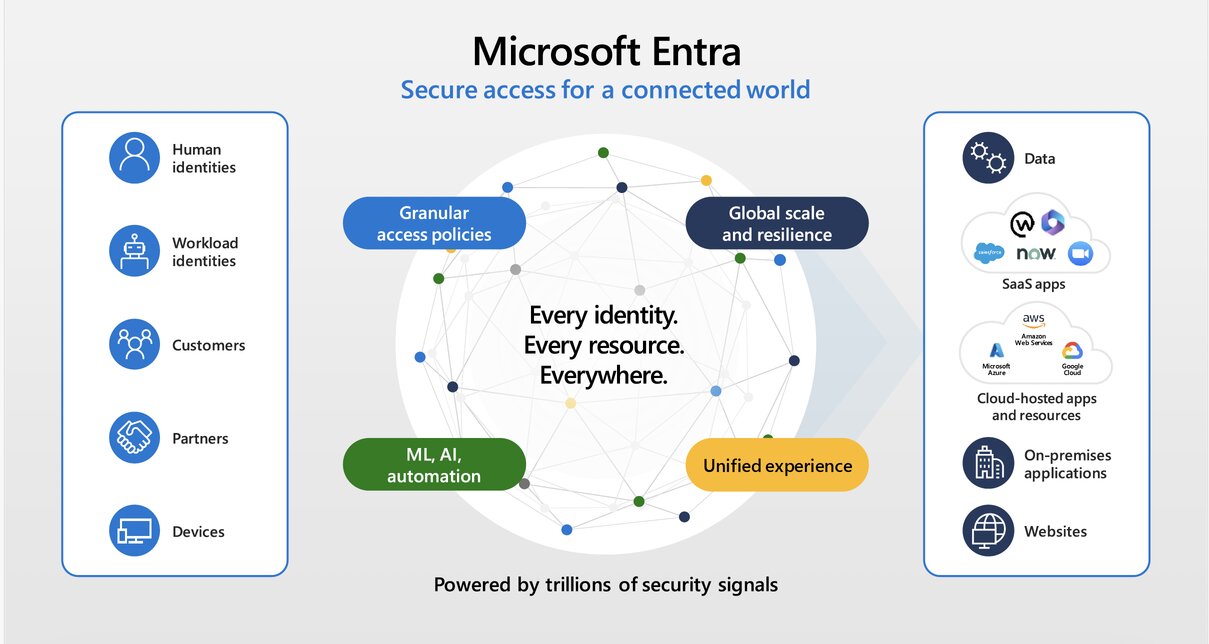
Use Microsoft Entra ID when the workload needs: Workforce identity, authentication, single sign-on, MFA, conditional Access, user and group management, application access, identity governance.
Azure RBAC: authorization to Azure resources
Azure Role-Based Access Control (Azure RBAC) is an authorization system built on Azure Resource Manager that manages who has access to Azure resources and what they can do. Access is granted by creating a role assignment combining a security principal, a role definition, and a scope. Azure Role-Based Access Control controls what identities can do with Azure resources.
Azure RBAC helps manage who has access to Azure resources, what they can do with those resources, and what scope that access applies to.
Use Azure RBAC when the workload needs Subscription-level access, resource group-level access, resource-level permissions, built-in roles, custom roles, least-privilege access, separation of duties, and delegated administration.
Microsoft Defender for Cloud: posture management and workload protection
Microsoft Defender for Cloud is a Cloud Native Application Protection Platform (CNAPP) that unifies security posture management and threat protection across multi-cloud (Azure, AWS, GCP), hybrid, and on-premises environments.
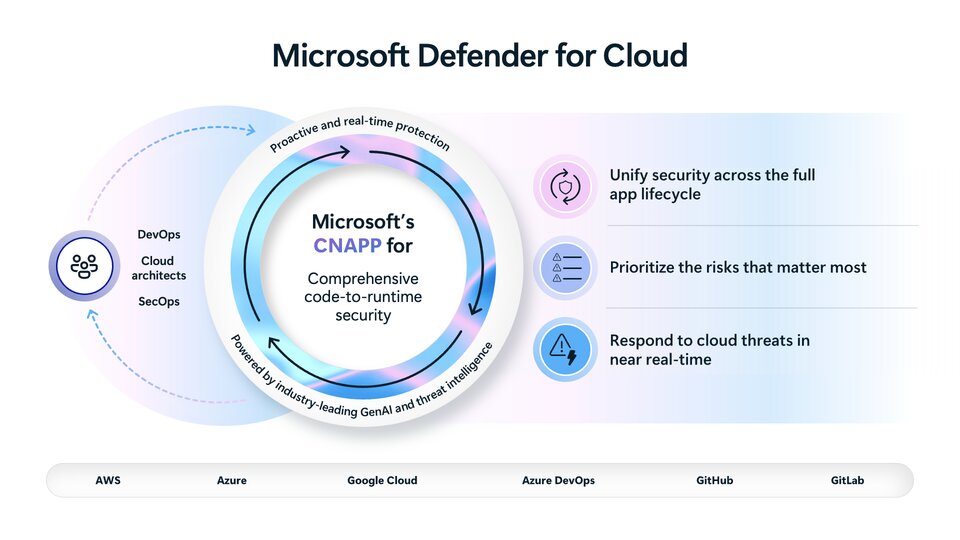 Use Microsoft Defender for Cloud when the workload needs: Security recommendations, secure score, regulatory compliance visibility, vulnerability visibility, threat protection, workload protection, multicloud and hybrid visibility and security posture management
Microsoft Defender for Cloud helps answer practical questions such as:
What is misconfigured, what is exposed, what is vulnerable, and what should we fix first?
Microsoft Defender for Servers: server workload protection
Microsoft Defender for Servers is a cloud workload protection solution within Microsoft Defender for Cloud. It secures Windows and Linux machines across Azure, multi-cloud environments (AWS, GCP), and on-premises data centers using endpoint detection, vulnerability assessments, and threat mitigation.
Microsoft Defender for Storage: storage workload protection
Microsoft Defender for Storage helps protect storage accounts and detect suspicious activity.
Microsoft Defender for SQL: database threat protection and vulnerability assessment
Microsoft Defender for SQL helps detect threats and vulnerabilities in SQL workloads.
Microsoft Defender for Containers: container and Kubernetes protection
Microsoft Defender for Containers helps protect containerized workloads and Kubernetes environments.
Microsoft Defender for App Service: App Service threat protection
Microsoft Defender for App Service helps detect threats targeting Azure App Service workloads.
Microsoft Sentinel: SIEM, SOAR, and incident response
Microsoft Sentinel is a cloud-native Security Information and Event Management (SIEM) and Security Orchestration, Automation, and Response (SOAR) platform. It uses artificial intelligence and automation to help security teams detect, investigate, and stop cyber threats across multi-cloud and multi-platform environments.
Use Microsoft Sentinel when the workload needs: Security information and event management, Security orchestration and automated response,incident investigation, threat detection rules, security analytics, log correlation and SOC workflows.
Microsoft Defender for Endpoint: endpoint detection and response
Microsoft Defender for Endpoint is a cloud-native enterprise security platform. It helps organizations prevent, detect, investigate, and respond to advanced cyberthreats across Windows, macOS, Linux, Android, iOS, and IoT devices.
Use Defender for Endpoint when the workload needs: Endpoint protection, server protection, endpoint detection and response, threat investigation, malware protection, device risk visibility, and integration with the Microsoft security ecosystem
Azure Firewall: network-level traffic filtering and threat protection
Azure Firewall is a managed, cloud-native network security service that protects Microsoft Azure Virtual Network resources. It is fully stateful, offers built-in high availability, and supports unrestricted cloud scalability to filter inbound, outbound, and east-west traffic.
Use Azure Firewall when the workload needs: Centralized network firewall, inbound and outbound filtering, egress control, network segmentation, threat intelligence filtering, private workload protection and hub-and-spoke security.
Azure Web Application Firewall: web application and API protection
Azure Web Application Firewall helps protect web applications from common exploits and vulnerabilities.
Use Azure WAF when the workload needs: Web application firewall protection, protection against common web attacks, OWASP-style protection, API protection, public web app protection, Layer 7 filtering, integration with Application Gateway or Front Door.
Azure DDoS Protection: availability protection for public workloads
Azure DDoS Protection defends cloud resources against distributed denial-of-service attacks. It features always-on traffic monitoring, automatic mitigation, and adaptive tuning.
Azure DDoS Protection helps protect internet-facing workloads from distributed denial-of-service attacks.
Use Azure DDoS Protection when the workload needs: DDoS protection, public workload availability protection, network-layer attack protection, business-critical internet-facing service protection and enhanced DDoS response support.
Azure Key Vault: secrets, keys, and certificate management
Azure Key Vault helps safeguard cryptographic keys, secrets, and certificates used by cloud applications and services.
Use Azure Key Vault when the workload needs: Secret storage, API keys, passwords, certificates, encryption keys, key rotation, centralized access control and auditability.
Azure Monitor and Log Analytics: logs, metrics, alerts, and visibility
Azure Monitor is a comprehensive telemetry platform for collecting, analyzing, and acting on performance and log data from cloud and on-premises environments.
Log Analytics is the specific tool and workspace environment within Azure Monitor used to write queries, inspect tables, and analyze log data using Kusto Query Language (KQL) or a point-and-click Simple mode.
Use Azure Monitor and Log Analytics when the workload needs: Metrics, logs, alerts, dashboards, querying and analysis, operational visibility and security signal collection.
Azure Activity Log: subscription-level audit trail
Azure Activity Log provides visibility into subscription-level events, including administrative operations.
Azure Policy: governance and compliance guardrails
Azure Policy helps enforce rules and evaluate resources for compliance. It helps you enforce organizational standards, control costs, secure data, and track compliance at scale across subscriptions and management groups.
Use Azure Policy when the workload needs: Policy enforcement, configuration compliance, resource standardization, allowed locations, required tags, security baselines, regulatory controls, guardrails across subscriptions.
Network Security Groups and Application Security Groups: basic network segmentation
Network Security Groups and Application Security Groups are foundational Azure network security controls.
Use NSGs and ASGs when the workload needs: Subnet-level traffic filtering, NIC-level traffic filtering, internal segmentation, allow and deny rules, application grouping, and basic network access control
Common pitfalls when choosing Azure security services
1. Enabling tools without defining the security outcome
Security products should map to specific risks, not checkboxes. Before enabling a service, define what risk it reduces and who will act on its findings.
2. Treating identity as separate from security architecture
Microsoft Entra ID, Azure RBAC, Conditional Access, and privileged access controls are foundational security services. Identity should be part of every Azure security discussion.
3. Ignoring logs until after an incident
Azure Activity Log, Azure Monitor, Log Analytics, Defender for Cloud, and Sentinel should be planned before something goes wrong. Without logs, investigation becomes guesswork.
4. Deploying detection without response ownership
Defender for Cloud and Sentinel findings need triage, escalation, and remediation paths. A finding with no owner is just noise.
5. Hardcoding secrets or mishandling certificates
Azure Key Vault should be considered for secrets, keys, certificates, and secure application configuration. Secrets should be controlled, monitored, rotated, and removed when no longer needed.
6. Skipping policy and governance guardrails
Azure Policy becomes important as environments grow across subscriptions, regions, and teams. Security should scale with the Azure structure.
7. Overlooking security service costs and operating capacity
Some services scale with logs, data ingestion, resources, workloads, alerts, or traffic. SMEs should start with a baseline and expand based on risk, compliance, and operating capacity.
Security choices should follow the workload risk
For SMEs, the best Azure security decision is not to enable every service immediately. It is to understand the workload risk and match the right service to the right control.
The wrong security design creates alert noise, blind spots, duplicated controls, unexpected costs, and unclear ownership.
The right security design creates stronger protection, better visibility, faster response, and a more secure cloud foundation.
Practical next step
Before choosing a Microsoft Azure security service, create a workload security profile.
Include:
- Workload type
- Public or private exposure
- Data sensitivity
- Identity and access pattern
- Threat detection needs
- Vulnerability management needs
- Web or API protection needs
- Network protection needs
- Secrets, keys, and certificate requirements
- Logging and audit requirements
- Compliance requirements
- Incident response process
- Subscription governance needs
- Team operating capacity
- Budget and cost constraints
This makes Azure security service decisions practical, risk-based, and easier to defend.
Need help choosing the right Microsoft Azure security service?
Reputiva helps organizations assess, secure, modernize, and optimize cloud environments across AWS, Azure, and GCP.
Book a consultation with Reputiva to assess your cloud readiness, security strategy, security posture, or modernization roadmap.