Microsoft 365 is a cloud-based subscription service that combines productivity apps, cloud storage, security tools, and AI features into a single platform. Microsoft 365 makes collaboration remarkably easy. That same connectivity also means security decisions can quickly cross application boundaries.
A file shared in Teams may actually reside in SharePoint. A user’s access may depend on Microsoft Entra and the compliance state of an Intune-managed device. An email threat may ultimately become an endpoint or identity incident. Sensitive information may need to remain protected regardless of where it is shared.
Microsoft 365 is a cloud-connected environment that brings multiple services such as Exchange, Teams, SharePoint, and OneDrive together, with identity controls, access policies, and compliance configurations protecting against unauthorized access and misuse.
This is why securing Microsoft 365 requires more than configuring Exchange, Teams, or SharePoint individually. It requires understanding the security architecture connecting them.
Microsoft 365 Is More Than a Collection of Applications
At its core, Microsoft 365 includes several major workloads:
- Exchange Online
- Microsoft Teams
- SharePoint Online
- OneDrive for Business
- Microsoft 365 Apps
- Microsoft 365 Groups
These workloads are deeply interconnected.
A security decision made in one Microsoft 365 workload can affect several others.
The Microsoft 365 Security Architecture at a Glance
Layer 1: Identity
Microsoft Entra ID
Microsoft Entra ID, formerly Azure Active Directory, is Microsoft’s cloud identity and access management platform. It helps organizations manage access to Microsoft 365, Azure, SaaS applications, on-premises applications, and other cloud resources.
Microsoft Entra ID provides authentication and authorization for users, administrators, applications, devices, and increasingly workload identities.
Identity controls include: multifactor authentication, conditional Access, authentication methods, identity protection, privileged Identity management (PIM), role-based administration, Guest and external identities.
If identity is compromised, the rest of the Microsoft 365 environment can quickly become exposed.
Layer 2: Devices and Access Context
Microsoft Intune + Microsoft Entra
Authentication answers: Who is the user? But modern security also needs to answer: What device are they using?
A user signing in from a compliant corporate laptop should not necessarily receive the same access as a user signing in from an unknown or compromised device.
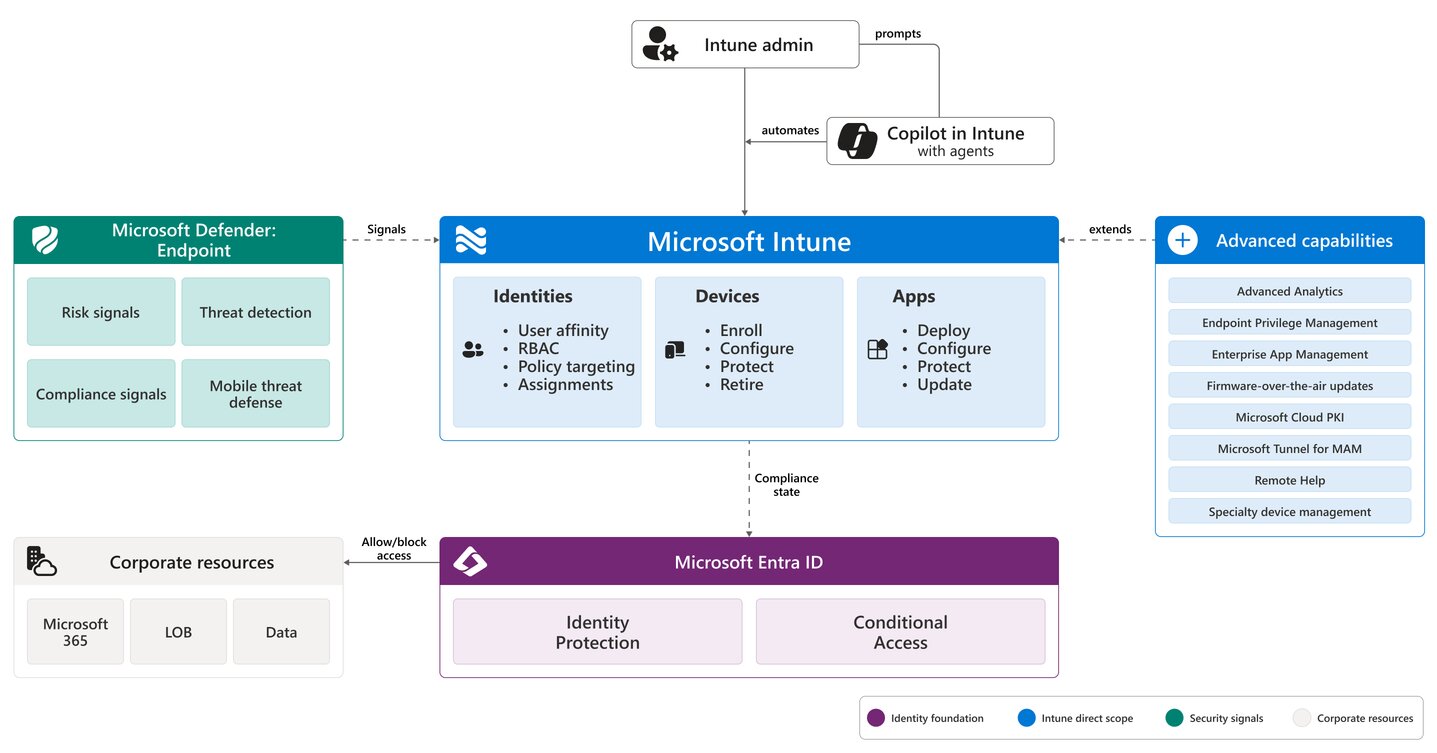
Microsoft Intune is Microsoft’s Endpoint protection and management platform that provides device management, configuration, compliance, and application-management capabilities.
Intune provides device posture. Entra evaluates access.
Microsoft’s Zero Trust guidance connects identity deployment, Intune device management, Defender XDR, and Purview information protection as parts of a Microsoft 365 security deployment.
Layer 3: Microsoft 365 Workloads
Exchange Online
Exchange Online is Microsoft’s cloud-based messaging service that provides enterprise-grade email, calendar, contacts, and tasks Exchange Online handles email, calendars, mailboxes, shared mailboxes and contacts.
From a security perspective, Exchange is a particularly important attack surface because email remains a common entry point for phishing, credential theft, malicious attachments, and social engineering. According to the Microsoft Digital Defense Report 2025, 28% of breaches investigated by Microsoft Incident Response were initiated through phishing or social engineering, reinforcing the importance of strong email security controls.
Microsoft reports that it screens 5 billion emails every day for malware and phishing, underscoring the scale of email-based threats organizations face.
Exchange security depends on multiple layers:
Identity protection + Exchange Online Protection + Defender for Office 365 + email authentication + data protection
Microsoft Teams
Microsoft Teams is a chat-based collaboration platform and “hub for teamwork” designed to bring people together in one place to meet, chat, call, and collaborate.
Microsoft Teams depends on several services across the Microsoft 365 ecosystem. User identities are managed through Microsoft Entra ID, files shared in Teams are stored in SharePoint, and features such as calendars, groups, and other collaboration functions rely on Exchange Online and Microsoft 365 Groups.
As a result, securing Teams requires a broader approach than configuring meeting and messaging policies alone. It includes identity controls, guest access, external access, teams apps, SharePoint permissions, file sharing, conditional Access and data governance.
SharePoint Online
SharePoint Online is a cloud-based collaboration and document management platform included in the Microsoft 365 suite that allows organizations to store, organize, and share files securely. It stores documents, supports intranets, powers collaboration sites, and provides much of the file infrastructure behind Teams.
OneDrive for Business
OneDrive provides user-focused file storage and collaboration. Its security architecture includes sharing controls, access permissions, conditional access, encryption, sensitivity labels, DLP and defender protections.
Layer 4: Threat Protection
Microsoft Defender
Microsoft Defender is a cross-platform security suite that protects devices, networks, and data against malware, phishing, and other online threats. Different Defender capabilities protect different parts of the environment.
Defender for Office 365
Defender for Office 365 protects email and collaboration workloads against threats such as: phishing, malicious attachments, malicious URLs, business email compromise and Zero-day malware.
Defender for Endpoint
Protects devices accessing Microsoft 365.
Defender for Identity
Provides identity-threat detection.
Defender for Cloud Apps
Provides SaaS visibility, application governance, and session-related controls.
Defender XDR
Microsoft Defender XDR is a unified enterprise defense suite that coordinates threat detection, prevention, investigation, and response across endpoints, identities, email, and cloud application.
Layer 5: Data Security and Governance
Microsoft Purview
Microsoft Purview is a comprehensive data governance, security, and compliance platform designed to help organizations manage, protect, and govern their data wherever it lives.
Microsoft Purview provides the data-security and governance layer. Capabilities include sensitivity labels, information protection, data loss prevention, data lifecycle management, records management, eDiscovery, audit, insider risk management and communication compliance.
Layer 6: Security Monitoring and Response
Microsoft 365 environments generate large amounts of security telemetry. This includes sign-in events, administrative activity, email detections, endpoint alerts, file activity, sharing activity, identity risk events and DLP incidents.
These signals can feed security operations workflows through the Microsoft Defender portal and, where broader SIEM capabilities are required, Microsoft Sentinel.
The Security Architecture in a Typical User Session
Consider an employee opening Microsoft Teams from a corporate laptop.
Step 1 – Identity
Microsoft Entra authenticates the user.
Step 2 – Authentication Strength
MFA or another authentication method verifies the user.
Step 3 – Device
Intune provides information about device compliance.
Step 4 – Risk Evaluation
Conditional Access evaluates identity, device, application, location, risk, and other relevant signals.
Step 5 – Application Access
The user accesses Microsoft Teams.
Step 6 – Content Access
The user opens a file stored in SharePoint.
Step 7 – Data Controls
Purview sensitivity or DLP policies govern how that document can be used or shared.
Step 8 – Threat Protection
Defender monitors relevant activity for malicious behavior.
Step 9 – Security Operations
Security signals can be correlated into incidents and investigated through Defender XDR or Sentinel.
Secure the Tenant as a System
One of the biggest mistakes organizations can make with Microsoft 365 is securing workloads independently.
- Exchange gets email policies.
- Teams gets meeting policies.
- SharePoint gets sharing restrictions.
- Endpoints get antivirus.
- MFA gets turned on.
Each control may be useful, but that does not automatically create a coherent security architecture.
Microsoft 365 should be treated as an interconnected system.
- Identity controls influence application access.
- Device posture influences authentication decisions.
- Teams depends on SharePoint and Exchange.
- Data controls cross workload boundaries.
- Defender connects security signals.
- Security operations bring those signals together.
The objective is therefore not simply to configure each Microsoft 365 product securely.
It is to ensure that the identity, endpoint, collaboration, data, threat-protection, and monitoring layers reinforce one another.
That is what turns a collection of Microsoft 365 security settings into an actual security architecture.
Need Help Securing Your Microsoft 365 Environment?
Microsoft 365 provides powerful security capabilities, but the effectiveness of those capabilities depends on how identity, endpoints, collaboration, data protection, and threat detection are configured together.
Reputiva helps organizations assess and strengthen Microsoft 365 environments across Microsoft Entra, Conditional Access, Intune, Defender, Purview, Teams, SharePoint, Exchange Online, and broader cloud security controls.
Whether you are establishing a Microsoft 365 security baseline, reviewing existing configurations, strengthening identity controls, or developing a broader Microsoft security roadmap, Reputiva can help identify gaps and prioritize practical improvements.
Talk to Reputiva about strengthening your Microsoft 365 security architecture.
Follow the Securing the Microsoft Cloud series as we explore one Microsoft security topic each week across identity, devices, applications, data, threat protection, security operations, and AI security.
Reputiva
Reputiva is a cloud, cybersecurity, and FinOps advisory firm helping SMEs reduce cyber risk, strengthen cloud environments, and manage technology costs with confidence. We publish practical insights on cloud security, identity, AI risk, compliance, and digital transformation.