Google Cloud Identity gives organizations a way to manage users, groups, devices, applications, and access across Google services and supported third-party apps. It can work alongside Google Workspace or be used for users who need managed Google accounts without a full Google Workspace license.
For small and medium-sized businesses, the key question is not simply whether to use Google Cloud Identity. The real question is: which identity plan provides the right balance of security, access control, device management, and cost?
This guide explains the main Google Cloud Identity licensing options and how to choose the right plan for your organization.
Google Cloud Identity is Google’s identity, access, app, and device management platform.
What is Google Cloud Identity?
Google Cloud Identity is an Identity-as-a-Service (IDaaS) and enterprise mobility management solution. It serves as the underlying directory and authentication engine for Google Cloud and Google Workspace, enabling IT administrators to manage users, devices, and application access from a single, centralized console.
Cloud Identity is an Identity as a Service (IDaaS) solution that centrally manages users and groups.
You can configure Cloud Identity to federate identities between Google and other identity providers, such as Active Directory and Microsoft Entra ID (formerly Azure AD).
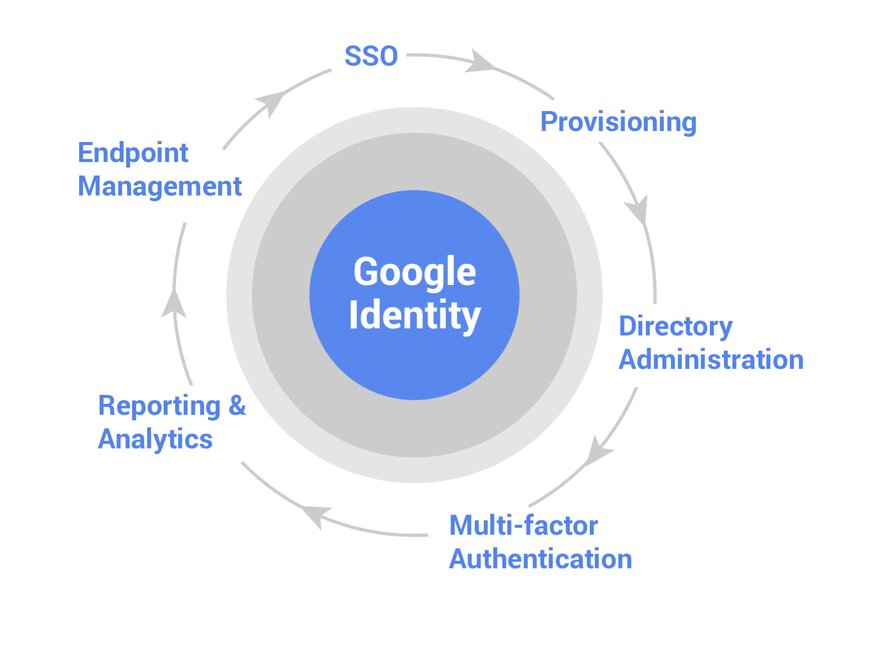
Google Cloud Identity helps organizations create and manage company-controlled Google accounts, enforce access policies, manage groups, support single sign-on, and protect access to Google services and third-party applications.
Why Identity Licensing Matters
For small businesses, identity management often starts informally. A few users are added. Admin roles are assigned. Contractors are invited. Third-party apps are connected. Devices are used for work. Over time, the organization may not have a clear view of who has access to what.
A good identity licensing decision should help answer questions such as:
- Who has access to company systems?
- Are users authenticating securely?
- Is multi-factor authentication enforced?
- Who has administrator privileges?
- Are former employees and contractors fully removed?
- Which third-party applications have access?
- Are devices trusted before access is granted?
- Can access be controlled based on risk, device, or context?
- Are cloud administrators using managed accounts?
- Are users over-licensed or under-protected?
Identity licensing is not only an IT decision. It is a business risk decision.
Google Cloud Identity Editions
Google Cloud Identity has two main editions:
- Cloud Identity Free
- Cloud Identity Premium
The Free edition provides core identity and endpoint management capabilities for users who need managed Google accounts but may not need Gmail or the full Google Workspace productivity suite.
The Premium edition adds more advanced enterprise security, application management, and device management capabilities.
Cloud Identity Free: Best for Basic Identity Management
Cloud Identity Free is designed for organizations that need managed Google accounts without assigning every user a paid Google Workspace license.
Cloud Identity Free can be especially helpful when a user needs a managed identity but does not need the full set of Workspace apps.
For example, a contractor may need access to a Google Cloud project but not the company Gmail. A technical administrator may need a managed account for Google Cloud access. A user may need to authenticate into a third-party application but not use Google Workspace email. In those cases, Cloud Identity Free can help the organization avoid assigning a full Google Workspace license where it is not needed.
Use Cloud Identity Free when:
- Users do not need Gmail
- Users do not need Google Calendar
- Users do not need the full productivity suite
- Contractors need limited access
- Technical users need Google Cloud access
- You want to avoid using personal Gmail accounts for business access
- You need basic user and group management
- You want to reduce unnecessary Workspace license spend
Cloud Identity Premium: Best for Stronger Security and Device Management
Cloud Identity Premium is designed for organizations that need more advanced identity, security, application, and endpoint management capabilities.
Cloud Identity Premium becomes more relevant when identity needs move beyond basic account management. For example, a business may need better device policies, stronger control over application access, or more advanced security features. A growing company may also need to ensure that access decisions consider user identity, device posture, and business risk.
Use Cloud Identity Premium when:
- Users access sensitive systems
- Users work remotely or from personal devices
- You need stronger mobile device management
- You need more advanced app management
- You need stronger security controls
- You need to manage access to third-party SaaS applications
- You need better control over administrator accounts
- You have client security requirements
- You need stronger identity governance
- You want identity to support a broader Zero Trust strategy
Premium is especially relevant for organizations that need to manage identity as a security control, not just as a user directory.
Google Workspace vs Cloud Identity: What Is the Difference?
Google Cloud Identity is Google’s standalone identity, access, and endpoint management service, while Google Workspace includes identity management alongside Google’s productivity apps (Gmail, Docs, Drive).
A user may need Google Workspace if they need:
- Business Gmail
- Google Calendar
- Google Drive storage
- Docs, Sheets, and Slides for collaboration
- Google Meet and Chat
- Shared drives
- Workspace-specific collaboration features
A user may only need Cloud Identity if they need:
- A managed Google account
- Access to Google Cloud resources
- Access to third-party applications
- Identity and authentication management
- Device or endpoint management
- Administrative access without productivity tools
In many organizations, Google Workspace and Cloud Identity are used together. For example, full-time employees may receive Google Workspace licenses, while contractors, service users, or technical administrators may receive Cloud Identity licenses.
Common Identity Licensing Mistakes Organizations Make
Many organizations make identity licensing decisions too late. They wait until there is an incident, an audit, a client questionnaire, an employee departure, or a cloud access issue before reviewing identity controls. Here are common mistakes to avoid.
Mistake 1: Giving Every User a Full Workspace License
Not every user needs Gmail, Drive, Calendar, and collaboration tools. Some users may only need a managed account to access Google Cloud, a third-party app, or a limited set of services. In those cases, Cloud Identity may be a better option than a full Workspace license.
This can reduce unnecessary licensing costs while improving account governance.
Mistake 2: Using Personal Gmail Accounts for Business Access
This is a common risk for small businesses. If employees, contractors, or administrators use personal Gmail accounts to access business systems, the organization may lose control over authentication, offboarding, recovery, and auditability.
Business access should be tied to managed organizational accounts. Cloud Identity can help create managed identities even when users do not need full Google Workspace licenses.
Mistake 3: Not Protecting Privileged Accounts
Administrator accounts are high-value targets. If a super admin or cloud administrator account is compromised, the attacker may gain access to users, settings, applications, billing, cloud resources, and sensitive data.
Privileged accounts should have stronger protections, including multi-factor authentication, limited role assignment, separate admin accounts where appropriate, and regular access review.
Mistake 4: Poor Employee and Contractor Offboarding
When users leave, access must be removed quickly and completely. Poor offboarding can leave former employees or contractors with lingering access.
Mistake 6: Not Reviewing Third-Party App Access
Many businesses connect Google accounts to third-party applications. Over time, users may grant access to apps that are no longer needed, poorly governed, or risky.
A good identity governance process should include reviewing third-party application access and ensuring that only approved tools can access business data.
Security Questions to Ask Before Choosing a Cloud Identity Plan
Before choosing between Cloud Identity Free and Cloud Identity Premium, organizations should ask:
- Do all users have managed business accounts?
- Are personal Gmail accounts being used for business access?
- Is multi-factor authentication enforced?
- Who has administrator access?
- Are admin accounts reviewed regularly?
- Do contractors need full Workspace licenses or only managed identities?
- Do cloud administrators need separate privileged accounts?
- Are users accessing systems from unmanaged devices?
- Are mobile devices protected?
- Are third-party applications reviewed?
- Is access removed quickly when users leave?
- Are groups and roles properly managed?
- Do client, partner, or regulatory expectations require stronger controls?
- Does the organization need identity controls as part of a Zero Trust strategy?
These questions help connect identity licensing to security risk.
Identity Licensing Should Support Security and Cost Control
Google Cloud Identity can help organizations manage users more securely while avoiding unnecessary Workspace licensing costs. But the decision should not be based solely on cost.
A practical identity licensing review should consider:
- Which users need full collaboration tools
- Which users only need managed identity
- Which users have privileged access
- Which users access sensitive systems
- Whether MFA is enforced
- Whether devices are managed
- Whether contractors are properly governed
- Whether third-party apps are reviewed
- Whether user offboarding is reliable
- Whether identity controls support the organization’s security posture
The best identity plan is not always the cheapest plan. It is the plan that gives the organization the right balance of access, security, governance, and cost.
Need Help Choosing the Right Google Identity Plan?
Reputiva helps small and medium-sized businesses review Google Workspace licensing, Google Cloud Identity, access controls, administrator roles, MFA, endpoint management, app access, and cost optimization.
Book a Google Workspace and Cloud Identity Review with Reputiva to choose the right identity plan, reduce risk, and strengthen your collaboration and cloud security foundation.