Every application depends on data, but not every application should use the same database. Every workload requires a different database. A customer portal, an e-commerce platform, a mobile app, a reporting dashboard, an IoT platform, an analytics warehouse, and a globally distributed application all have different database needs. Some require traditional relational databases. Some need serverless document storage. Others need global consistency, high-throughput NoSQL, in-memory caching, or large-scale analytics.
Google Cloud provides multiple managed database services for different data models, workload patterns, performance requirements, migration paths, and operational needs. Its database portfolio includes services such as Cloud SQL, AlloyDB for PostgreSQL, Spanner, Firestore, Bigtable, Memorystore, BigQuery, and Database Migration Service.
Why database decisions matter
Database choices are foundational cloud architecture decisions. The wrong database service can create performance bottlenecks, unnecessary cost, operational complexity, migration challenges, and security gaps. The right database service can improve application performance, simplify operations, support growth, and create a stronger foundation for modernization.
Database decisions affect application performance, scalability, data model fit, availability, backup and recovery, security and access control, cost optimization, migration complexity and long-term application flexibility.
For SMEs, this matters because database platforms are often harder to change later than compute or storage services. Once an application is built around a specific data model and query pattern, moving to another database can require significant redesign.
Start with the workload, not the service name
Before choosing a GCP database service, ask:
- Is the data relational, document-based, wide-column, in-memory, or analytical?
- Does the workload require SQL?
- Does the application need transactions?
- How much scale does the workload need?
- Does the workload need global availability or strong consistency?
- What are the most common read and write patterns?
- Does the workload need low-latency access?
- Is the application mobile, web, backend, or analytics-focused?
- Is this an operational database or an analytics platform?
- Is the organization migrating an existing database or building a new one?
The better question is not simply, “Which GCP database should we use?” The better question is, “What does the workload actually need?”
Main GCP database service options
| Workload Need | GCP Database Service |
|---|---|
| Traditional relational database | Cloud SQL |
| High-performance PostgreSQL-compatible relational database | AlloyDB for PostgreSQL |
| Globally scalable relational database | Spanner |
| Serverless document database | Firestore |
| Wide-column high-throughput NoSQL database | Bigtable |
| In-memory caching and low-latency access | Memorystore |
| Data warehouse and analytics | BigQuery |
| Database migration and modernization | Database Migration Service |
Cloud SQL: Fully-managed relational database service
Google Cloud SQL is a fully managed relational database service that supports MySQL, PostgreSQL, and SQL Server database engines. It eliminates the operational overhead of managing physical infrastructure, allowing teams to focus on data structures and application logic.
Use Cloud SQL when the workload needs:
- SQL
- Structured data
- Transactions
- MySQL, PostgreSQL, or SQL Server compatibility
- Existing relational application migration
- Traditional business applications
- A familiar relational database administration model
AlloyDB for PostgreSQL: high-performance PostgreSQL workload
AlloyDB for PostgreSQL is a fully managed, high-performance, PostgreSQL-compatible relational database service. AlloyDB is a modernization option for PostgreSQL applications and migrations.
AlloyDB for PostgreSQL is ideal for:
- PostgreSQL compatibility
- Higher-performance relational workloads
- Business-critical applications
- Modernization from self-managed PostgreSQL
- Analytical and transactional PostgreSQL patterns
- A more cloud-optimized PostgreSQL experience
Spanner: globally scalable relational workloads
Cloud Spanner is a fully managed, mission-critical database that combines the unlimited horizontal scale of NoSQL with the ACID transactional consistency of traditional relational databases.
Use Spanner when the workload needs:
- Relational data model
- Strong consistency
- Horizontal scale
- High availability
- Global or multi-region application design
- Transactional consistency at scale
- Mission-critical systems
Firestore: serverless document database workloads
Firestore is a serverless NoSQL document database for application development, especially web and mobile applications.
Use Firestore when the workload needs:
- Document-style data
- Flexible schema
- Mobile and web applications
- Real-time application patterns
- Serverless operations
- Automatic scaling
- User profiles, app state, catalogs, and content-style data
Bigtable: high-throughput NoSQL workloads
Bigtable is Google’s fully managed, highly scalable NoSQL database designed for massive analytical and operational workloads. It offers single-digit millisecond latency and can scale to handle millions of operations per second, making it ideal for time-series data, IoT, and real-time application state.
Use Bigtable when the workload needs:
- Massive scale
- Low-latency reads and writes
- Wide-column data model
- Time series or event-style data
- IoT telemetry
- Operational analytics
Memorystore: in-memory caching and low-latency access
Memorystore is Google Cloud’s managed in-memory database service for caching and low-latency application patterns.
Use Memorystore when the workload needs:
- In-memory caching
- Low-latency data access
- Session storage
- Frequently accessed data
- Reduced load on the primary database
- Faster application response times
BigQuery: analytics and data warehousing
BigQuery is a fully managed, serverless enterprise data warehouse designed to handle massive datasets. It decouples storage and compute, allowing you to run fast SQL queries over petabytes of data without needing to manage infrastructure.
Use BigQuery when the workload needs:
- Data warehousing
- Business intelligence
- Reporting
- Large-scale analytics
- Aggregations across large datasets
- SQL analytics
- Near real-time analytics pipelines
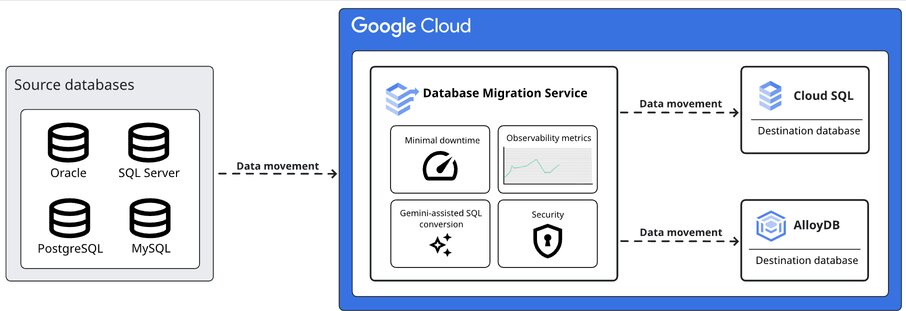
Database Migration Service
Database Migration Service helps organizations migrate data to Google Cloud. The DMS supports migrations into Cloud SQL and AlloyDB for PostgreSQL. It also supports migration from MySQL, PostgreSQL, SQL Server, and Oracle databases to Cloud SQL and AlloyDB.
For SMEs, database migration should be considered early. Migration complexity can influence whether Cloud SQL, AlloyDB, Spanner, Firestore, Bigtable, or BigQuery is the better long-term destination.
Common pitfalls when choosing GCP database services
1. Choosing Cloud SQL by default for every workload
Cloud SQL is practical for relational workloads, but not every workload belongs in a traditional relational database.
2. Using Spanner before the workload needs Spanner
Spanner is powerful, but it should be chosen because the application needs global scale, strong consistency, and high availability.
3. Treating BigQuery like an application database
BigQuery is for analytics and data warehousing. It should not be used as the primary transactional database for application workloads.
4. Ignoring Firestore for serverless document applications
Some web and mobile applications may be better served by a serverless document database than a traditional relational model.
5. Using Bigtable without clear access patterns
Bigtable is strong for high-throughput, low-latency NoSQL workloads, but it requires a clear data model and access pattern.
6. Overlooking caching opportunities
Some performance issues can be solved with Memorystore rather than over-scaling the primary database.
7. Not planning migration early
Existing MySQL, PostgreSQL, SQL Server, and Oracle databases may have different migration paths into Google Cloud.
Database choices should follow the data model
For SMEs, the best GCP database decision is not about choosing the most popular service. It is about aligning the database with the workload’s data model, access patterns, performance needs, security requirements, availability goals, migration constraints, and operational capacity.
A traditional relational application may belong on Cloud SQL.
A high-performance PostgreSQL workload may be a good fit for AlloyDB.
A globally distributed relational workload may require Spanner.
A serverless document application may fit Firestore.
A high-throughput wide-column workload may need Bigtable.
A performance issue may need Memorystore rather than a larger primary database.
An analytics workload may belong on BigQuery.
The wrong database choice can lead to costs, complexity, performance issues, and migration challenges later. The right choice creates a stronger foundation for performance, resilience, modernization, and growth.
Practical next step
Before choosing a GCP database service, create a workload profile.
Include:
- Data model
- Query patterns
- Transaction requirements
- Read/write volume
- Latency requirements
- Scale expectations
- Availability requirements
- Backup and recovery requirements
- Security and compliance requirements
- Migration constraints
- Cost sensitivity
- Team operating capacity
This makes the database decision more practical and less dependent on guesswork.
Need help choosing the right GCP database service?
Reputiva helps organizations assess, secure, modernize, and optimize cloud environments across AWS, Azure, and GCP.
Book a consultation with Reputiva to assess your cloud readiness, database strategy, security posture, or modernization roadmap.