Containers make applications easier to package and move, but they do not eliminate the need for sound architectural decisions. On AWS, teams can run containers with App Runner, Amazon ECS, Amazon EKS, AWS Fargate, Amazon ECR, or AWS Batch. Each option solves a different operating problem.
The right choice depends on the workload pattern, team maturity, scaling needs, security requirements, and cost model.
Containers vs Virtual Machines
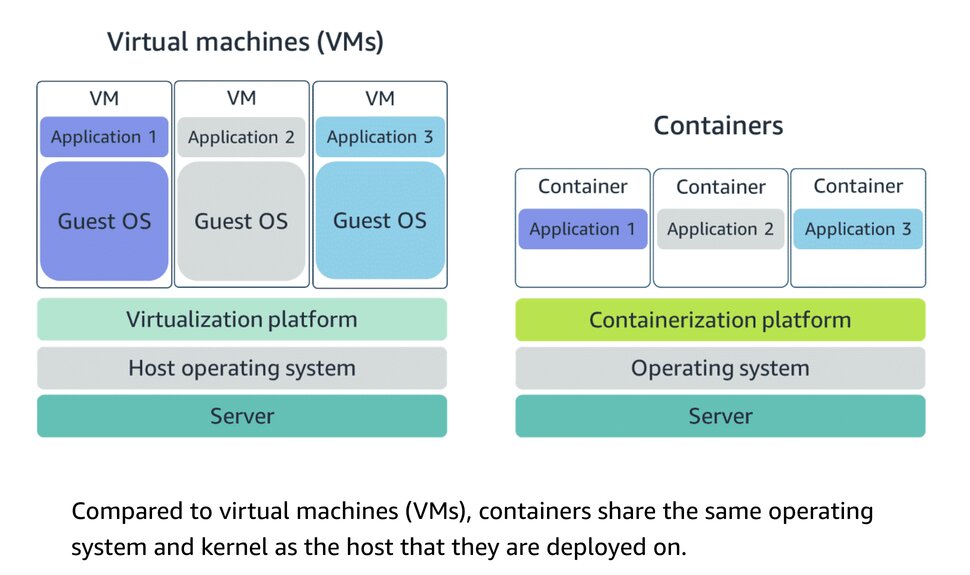
A container is a standardized unit that packages your code and its dependencies. This package is designed to run reliably on any platform, because the container creates its own independent environment. With containers, workloads can be carried from one place to another, such as from development to production or from on-premises environments to the cloud.
Virtual machines contain their own operating system. Each virtual machine must maintain a copy of an operating system, which results in a degree of wasted resources.
For SMEs, the goal is not to choose the most advanced container platform. The goal is to choose the model that fits the workload and the team.
The better question is not simply:
Which AWS container service should we use?
The better question is:
What are we trying to run: a simple web app, API, worker, batch job, AWS-native service, Kubernetes workload, or multi-service platform?
Why AWS container service decisions matter
Container choices become operating model choices.
The container platform affects how teams deploy, scale, secure, monitor, troubleshoot, patch, and pay for workloads.
The right AWS container choice should support:
- Application pattern
- Orchestration needs
- Scaling model
- Infrastructure responsibility
- Kubernetes requirements
- AWS-native integration
- Security and image governance
- Observability
- Cost model
- Team skills
- Future modernization path
Start with the workload pattern, not the service name
Before choosing an AWS container service, ask:
- Is this a web app, API, worker, batch job, or multi-service platform?
- Does the workload truly need Kubernetes?
- Does the team already have Kubernetes skills?
- Does the team want to manage servers or use serverless containers?
- Does the workload need host-level customization?
- Does the workload need predictable long-running capacity?
- Does it need event-driven or job-based processing?
- What are the logging, monitoring, secrets, and image-scanning requirements?
- What cost model can the team manage?
- How much container platform complexity can the team realistically operate?
The best container decision starts with the workload and operating model, not the product name.
Main AWS container service options
| Container Need | AWS Service |
|---|---|
| AWS-native container orchestration | Amazon ECS |
| Serverless AWS-native containers | Amazon ECS with AWS Fargate |
| ECS orchestration with host-level control | Amazon ECS on EC2 |
| Kubernetes orchestration | Amazon EKS |
| Kubernetes without worker node management | Amazon EKS with AWS Fargate |
| Simple containerized web apps and APIs | AWS App Runner |
| Container image registry and lifecycle governance | Amazon ECR |
| Containerized batch jobs | AWS Batch |
Amazon ECS: AWS-native container orchestration
Amazon Elastic Container Service (ECS) is a fully managed container orchestration service that is a strong fit for teams seeking AWS-native orchestration without Kubernetes complexity.
Use Amazon ECS when the workload needs container orchestration, AWS-native service integration, web apps and APIs, background workers, scheduled tasks, load balancing, service discovery, and choice of Fargate or EC2 capacity.
Amazon ECS with AWS Fargate: serverless containers
Amazon ECS with AWS Fargate offers strong isolation for agentic workloads, delivering secure, efficient resource management for sensitive AI applications. Ideal for teams that want container orchestration without having to manage EC2 instances.
Use ECS with Fargate when the workload needs containers without server management, background workers, scheduled tasks, automatic capacity provisioning, less infrastructure management, and a simpler operating model for small teams.
Amazon ECS on EC2: more host-level control
ECS on EC2 is useful when the team wants ECS orchestration but needs more control over the underlying compute layer. An Amazon ECS container instance is an Amazon EC2 instance that runs the Amazon ECS container agent and is registered to a cluster.
Use ECS on EC2 when the workload needs custom EC2 instances, specialized instance types, host-level agents or configuration, predictable long-running capacity, greater control over compute utilization and cost optimization at scale
Amazon EKS: Kubernetes orchestration
Use Amazon EKS when the workload needs Kubernetes APIs, Kubernetes ecosystem tools, multi-cloud or hybrid portability, advanced orchestration, service mesh, custom controllers or operators, platform engineering, or existing Kubernetes skills
EKS with Fargate is useful when the team needs Kubernetes but wants to reduce worker node management.
Use EKS with Fargate when the workload needs Kubernetes orchestration, serverless pod execution, reduced worker node operations, pod-level isolation, managed compute capacity, and Kubernetes API compatibility.
AWS Batch: containerized batch processing
AWS Batch is useful when the container workload is not a long-running web service but a job-based workload.
Use AWS Batch when the workload needs batch processing, job queues, containerized jobs, data processing, ML or simulation jobs, scheduled or event-driven processing, or large-scale job orchestration.
Amazon ECR: container image registry and governance
Amazon Elastic Container Registry (Amazon ECR) is a fully managed container registry service that lets you securely store, manage, and deploy Docker and Open Container Initiative (OCI) images
Use Amazon ECR when the workload needs private container image storage, image scanning, ifecycle policies, CI/CD integration, deployment to ECS, EKS, App Runner, or AWS Batch and central image governance.
Common pitfalls when choosing AWS container services
1. Choosing Kubernetes by default
EKS is powerful, but many containerized web apps and APIs do not need Kubernetes.
2. Ignoring ECS for AWS-native workloads
ECS can be a strong fit when the team wants orchestration without the complexity of Kubernetes.
3. Assuming Fargate removes all operations
Fargate removes server management, but teams still manage images, IAM, secrets, networking, scaling, monitoring, and deployment.
4. Treating batch jobs like web services
AWS Batch may be a better fit for job-based processing than a long-running container service.
5. Forgetting cost model differencesApp Runner, Fargate, ECS on EC2, and EKS all have different costs and utilization patterns.
6. Ignoring ECR governance
Container image lifecycle, scanning, and permissions are part of the container operating model.
7. Underestimating observability needs
Containers still need logs, metrics, traces, health checks, alerts, and incident response planning.
Container choices should follow the operating model
For SMEs, the best AWS container decision is not always the most advanced service. It is the service that matches the workload pattern, team skills, cost expectations, and operating maturity.
The wrong container choice creates unnecessary complexity, weak ownership, poor image governance, cost surprises, and operational friction.
The right container choice gives the team a practical path for deploying, securing, scaling, monitoring, and improving containerized applications.
Practical next step
Before choosing an AWS container service, create a container workload profile.
Include:
- Application type
- Web app, API, worker, or batch job
- Number of services
- Container image source
- Kubernetes requirement
- Serverless container preference
- Host-level control requirement
- Networking requirements
- Scaling pattern
- Deployment workflow
- Secrets management needs
- Image scanning requirements
- Logging and monitoring needs
- Security and compliance needs
- Cost expectations
- Team container skill level
- Platform operations capacity
- Future modernization path
This makes the AWS container decision practical, workload-based, and aligned with the organization’s operating model.
Need help choosing the right AWS container service?
Reputiva helps organizations assess, secure, modernize, and optimize cloud environments across AWS, Azure, and GCP.
Book a consultation with Reputiva to assess your cloud readiness, container strategy, security posture, cost model, or modernization roadmap.