Cloud storage is one of the most important decisions organizations make when building, migrating, or modernizing workloads on AWS. It is also one of those decision points that is very easy to underestimate. Storage is not just about where data lives. It affects application performance, cost, backup strategy, disaster recovery, compliance, security, analytics, and long-term scalability.
AWS provides multiple storage services for different workload patterns, including object storage, block storage, file storage, hybrid storage, backup, transfer, and migration services. The challenge is not simply knowing that these services exist. The real challenge is choosing the right storage service for the right workload.
According to the AWS Decision Guide for storage, AWS storage choices should be aligned with business needs, access patterns, performance requirements, and migration considerations.
Why choosing the right storage matters
Choosing the wrong storage service can lead to problems later, including higher costs, slower application performance, complex migrations, limited backup coverage, or security gaps. For example, a database workload that requires low-latency storage should not be treated the same as an archive, media repository, shared file system, or data lake.
Before selecting a service, organizations should understand:
- What type of data is being stored
- How the data will be accessed
- Whether the workload needs object, block, or file storage
- Whether data access is read-heavy, write-heavy, or latency-sensitive
- Whether multiple systems need shared access
- What backup and disaster recovery requirements apply
- What security and compliance controls are required
- How the storage choice affects cost over time
A storage decision should begin with the workload, not the service name.
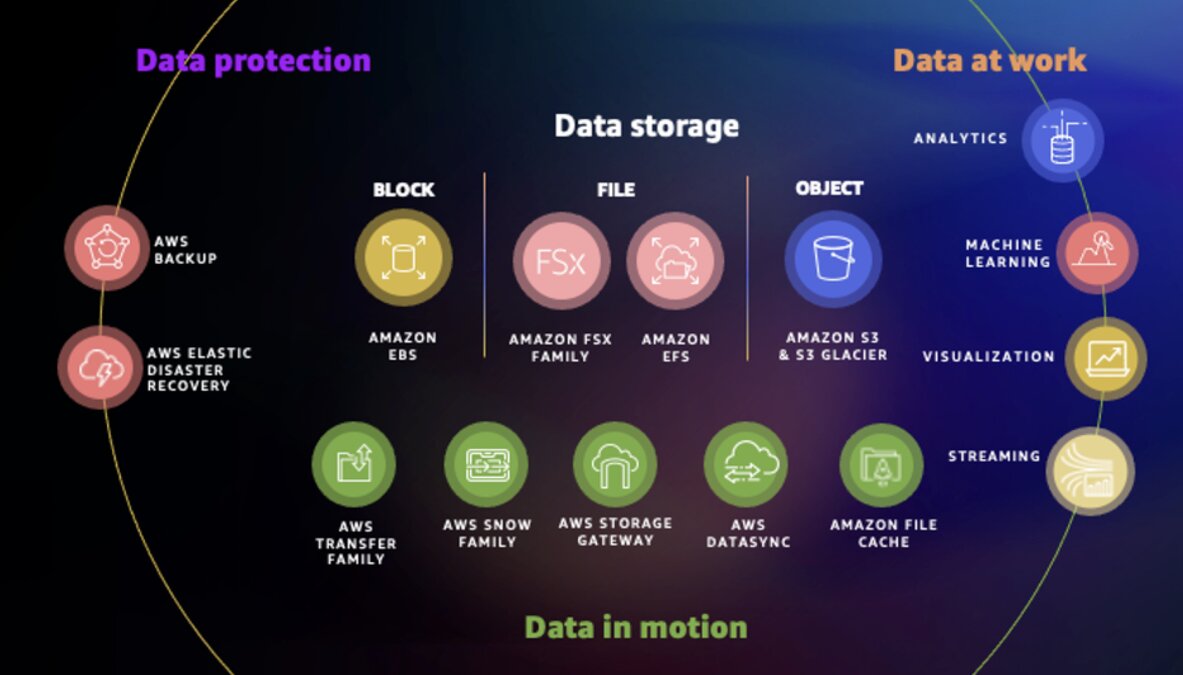
AWS storage categories
AWS offers a broad portfolio of reliable, scalable, and secure storage services for storing, accessing, protecting, and analyzing your data.
Object storage
Primary AWS service: Amazon S3
Object storage is designed for storing data as objects with metadata. It is commonly used for content distribution, web hosting, backups, archives, data lakes, analytics, and machine learning workflows.
Amazon S3 is often the right fit for storing, accessing, and distributing data at scale over the internet. The AWS guide describes object storage as well-suited for read-heavy workloads such as content distribution, web hosting, big data analytics, and ML workflows.
Use object storage when you need:
- Scalable storage for unstructured data
- Data lake foundations
- Backup repositories
- Static website content
- Media files
- Logs and analytics data
- Long-term retention
Block storage
Primary AWS service: Amazon EBS
Block storage is optimized for applications that need fast, low-latency access to storage attached to a compute instance. It takes any data, like a file or database entry, and divides it into blocks of equal sizes. The block storage system then stores the data block on the underlying physical storage in a manner optimized for fast access and retrieval.
Amazon Elastic Block Store, or Amazon EBS, is commonly used with Amazon EC2 for databases, enterprise applications, boot volumes, and workloads that need durable, high-performance storage.
Use block storage when you need:
- Storage attached to a single EC2 instance
- Low-latency application performance
- Database storage
- Persistent storage for compute workloads
- Fine-grained performance configuration
File storage
Primary AWS services: Amazon EFS and Amazon FSx
File storage is useful when multiple systems need to share access to files using familiar file system protocols.
- Amazon EFS is commonly used for Linux-based shared file storage.
- Amazon FSx provides managed file systems such as FSx for Windows File Server, FSx for Lustre, FSx for NetApp ONTAP, and FSx for OpenZFS.
File systems store data in a hierarchical structure of files and folders. In network environments, file-based storage often uses network-attached storage (NAS) technology. NAS allows users to access network storage data in similar ways to a local hard drive. File storage is user-friendly and allows users to manage file-sharing control.
The AWS storage guide notes that file-based storage is natively mountable by operating systems via protocols such as NFS and SMB, making it useful for workloads that require shared data access across multiple compute instances.
Use file storage when you need:
- Shared file access
- Multi-instance application access
- Enterprise file shares
- Windows file server workloads
- Linux file systems
- High-performance computing
- Machine learning training workloads
- Migration paths from existing file systems
Cache storage
Primary AWS service: Amazon File Cache
A cache is a high-speed data storage layer that temporarily stores frequently accessed or recently used data closer to the point of access, improving system performance and reducing latency. It serves as a buffer between the slower and larger primary storage (such as disks or remote storage) and the computing resources that need to access the data.
Amazon File Cache provides a high-speed cache on AWS that makes it easier to process file data, regardless of where it’s stored. Amazon File Cache is designed for high-speed access to file data stored in different locations, including on-premises file systems, Amazon FSx, and Amazon S3.
Use cache storage when you need:
- Faster access to frequently used file data
- Temporary high-performance storage
- Acceleration for on-premises or cloud file workloads
- Performance improvement without fully moving the source data immediately
Hybrid and edge storage
Primary AWS service: AWS Storage Gateway
Hybrid/Edge storage combines on-premises storage infrastructure with cloud storage services, enabling data mobility between the two environments based on requirements such as performance, cost, and compliance. It provides benefits such as low-latency access, cost optimization, data sovereignty, cloud scalability, and business continuity.
Hybrid and edge storage is useful when on-premises applications still need access to cloud-backed storage.
AWS Storage Gateway supports scenarios where organizations want to connect existing on-premises environments with AWS storage.
Use hybrid storage when you need:
- Low-latency access for on-premises applications
- Cloud-backed file, volume, or tape storage
- Gradual migration to AWS
- Hybrid backup or archive use cases
- Business continuity between on-premises and cloud environments
Storage migration decisions
Choosing the storage service is only part of the decision. Organizations also need to decide how data will move into AWS. The AWS guide separates migration options into online and offline approaches. Online migration is better for time-critical or frequently updated data, while offline migration is useful for large one-time transfers, limited bandwidth situations, or cases where data can remain static during transit.
Online migration options
Examples include:
- AWS DataSync
- AWS Transfer Family
- AWS Storage Gateway
- Amazon FSx for NetApp ONTAP SnapMirror
Online migration is useful when:
- Data changes frequently
- Downtime must be minimized
- Transfers need to happen continuously
- Network bandwidth is sufficient
Offline migration options
Example:
- AWS Snowball
Offline migration is useful when:
- Data volume is very large
- Bandwidth is limited
- A physical transfer is more predictable
- The data can remain static during transport
Key questions before choosing AWS storage
Before selecting an AWS storage service, ask these questions.
1. What type of data are we storing?
Structured database data, application files, media assets, logs, backups, archives, and machine learning datasets may require different storage services.
2. How will the data be accessed?
A workload that needs millisecond-level access is different from a workload that stores infrequently accessed archives.
3. Does the workload need object, block, or file storage?
This is one of the most important early decisions.
- Choose object storage for scalable unstructured data.
- Choose block storage for low-latency storage attached to compute.
- Choose file storage for shared file access across systems.
4. Is the workload read-heavy or write-heavy?
Read-heavy workloads such as content delivery, analytics, and ML pipelines often fit object storage patterns. Write-heavy transactional workloads may require block storage or a purpose-built database architecture.
5. Is latency critical?
If latency is a major requirement, the storage service must be selected with performance, IOPS, throughput, and access pattern in mind.
6. Do multiple systems need shared access?
If yes, file storage such as Amazon EFS or Amazon FSx may be more appropriate than block storage.
7. What backup and recovery requirements apply?
Storage decisions should include backup frequency, retention period, recovery time objective, and recovery point objective.
8. What security and compliance controls are needed?
Access control, encryption, monitoring, logging, and data residency considerations should be part of the storage decision.
9. What is the cost model?
Storage cost is not just capacity. It can include data transfer, retrieval, replication, requests, performance tiers, backup, and lifecycle policies.
Common pitfalls when choosing AWS storage
One common mistake is choosing storage based only on price.
The lowest-cost storage option may not be the best option if the workload requires frequent access, low latency, high throughput, or fast recovery.
The lowest-cost storage option may not be the best option
Another mistake is using one storage service for every workload. Cloud storage is not one-size-fits-all. A modern AWS environment often uses multiple storage services for different needs.
A third mistake is ignoring lifecycle management. Data accessed daily should not always be treated the same as data kept for compliance, audit, backup, or long-term retention.
Storage Choices Should Start With the Workload
The right AWS storage service is not always the most advanced option. It is the service that best fits the workload’s access pattern, performance requirement, security need, recovery objective, and cost profile.
For organizations modernizing on AWS, storage decisions should be made early and reviewed regularly. As applications grow, data volumes increase, compliance requirements evolve, and analytics or AI use cases emerge, the original storage architecture may need to change.
A good storage strategy should answer four practical questions:
Where should the data live?
How should it be accessed?
How should it be protected?
How should cost be managed over time?
Practical next step
Before choosing an AWS storage service, create a simple workload storage profile.
Document:
- Data type
- Access pattern
- Performance requirement
- Latency sensitivity
- Backup requirement
- Recovery objective
- Security requirement
- Compliance requirement
- Expected growth
- Cost sensitivity
That profile will make it easier to choose between Amazon S3, Amazon EBS, Amazon EFS, Amazon FSx, AWS Storage Gateway, AWS DataSync, AWS Backup, AWS Transfer Family, and AWS Snow Family.
Need help choosing the right AWS storage architecture for your workload?
Reputiva helps organizations assess, secure, modernize, and optimize cloud environments across AWS, Azure, and GCP.
Book a consultation with Reputiva to assess your cloud readiness, storage strategy, security posture, or modernization roadmap.