Cloud storage is one of the most important decisions organizations make when building, migrating, or modernizing workloads on Google Cloud. It affects more than where data lives. Storage choices influence performance, cost, security, backup, disaster recovery, analytics, AI readiness, application design, and long-term scalability.
Google Cloud provides multiple storage services for different workload patterns, including object storage, block storage, file storage, container storage, transfer services, and specialized options for analytics and AI/ML workloads. The challenge is not simply knowing that these services exist. The real challenge is choosing the right storage service for the right workload.
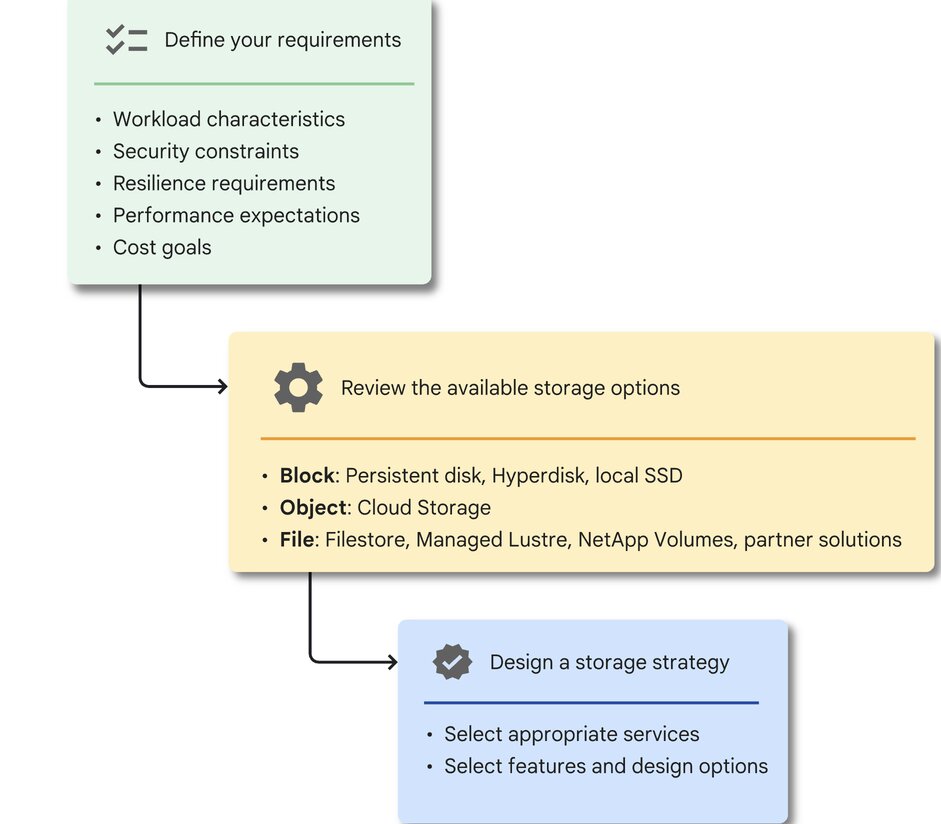
Google Cloud’s Architecture Center recommends starting by assessing the workload’s storage requirements, understanding the available Google Cloud storage options, and designing a storage strategy that delivers the best business value.
Why choosing the right GCP storage matters
Choosing the wrong storage service can lead to issues later, including slow application performance, unnecessary costs, poor data access patterns, migration friction, backup gaps, or operational complexity.
A database workload does not have the same storage requirement as a content repository, analytics lake, shared file system, containerized application, machine learning pipeline, or archive.
Before choosing a GCP storage service, organizations should understand:
- What type of data is being stored
- How frequently the data will be accessed
- Whether the workload needs object, block, or file storage
- Whether access needs are latency-sensitive or throughput-heavy
- Whether multiple compute resources need shared access
- Whether the workload runs on Compute Engine, GKE, Cloud Run, analytics services, or AI/ML platforms
- What backup, retention, and disaster recovery requirements apply
- What security and compliance controls are required
- How the storage choice affects cost over time
A storage decision should begin with the workload, not the product name.
GCP storage categories
Google Cloud storage services can be grouped into several major categories.
Object storage
Primary GCP service: Cloud Storage
Cloud Storage is Google Cloud’s object storage service for storing and accessing unstructured data. It is commonly used for application assets, media files, backups, archives, data lakes, analytics, AI/ML datasets, and global content distribution.
Cloud Storage is a managed service for storing unstructured data and retrieving it as often as needed.
Use Cloud Storage when you need:
- Scalable object storage
- Data lakes
- Backup repositories
- Static assets
- Media storage
- Analytics datasets
- AI/ML training data
- Long-term retention
- Global access patterns
Cloud Storage also provides multiple storage classes, including Standard, Nearline, Coldline, and Archive. These classes help organizations match storage cost to access frequency and retention needs.
Understanding Storage Classes
- Standard: frequently accessed data
- Nearline: data accessed roughly monthly or less
- Coldline: data accessed less often, such as quarterly
- Archive: long-term retention and data accessed rarely
Block storage
Primary GCP services: Hyperdisk, Persistent Disk, and Local SSD
Block storage is used when a workload needs disk storage attached to a virtual machine or compute instance. GCP block storage options include Hyperdisk, Persistent Disk, and Local SSD.
Google Cloud’s Compute Engine disk guidance recommends first deciding whether the workload needs durable or temporary block storage. If the workload needs temporary block storage, Local SSD may be appropriate. If the workload needs durable storage, organizations should continue evaluating Hyperdisk or Persistent Disk options.
Use block storage when you need:
- VM-attached storage
- Database storage
- Boot disks
- Low-latency application storage
- Durable storage for Compute Engine workloads
- Configurable performance for demanding workloads
Persistent Disk
Persistent Disk is durable block storage for Compute Engine workloads. It is often used for boot disks, databases, and applications that need persistent storage attached to virtual machines
Hyperdisk
Hyperdisk is a newer generation of Google Cloud block storage designed for workloads that need more configurable performance. It is useful when organizations need to provision storage with specific IOPS and throughput requirements.
With Hyperdisk you can provision, manage, and scale your Compute Engine workloads without the cost and complexity of a typical on-premises storage area network (SAN).
Local SSD
Local SSD is useful for high-performance, low-latency temporary storage. However, it should not be treated as durable storage. Google Cloud documentation notes that Local SSD data cannot be backed up with disk images, standard snapshots, or disk clones, and recommends storing valuable data on durable storage such as Persistent Disk or Hyperdisk.
File storage
Primary GCP service: Filestore
Filestore is Google Cloud’s managed file storage service. It is designed for workloads that require shared file access using NFS.
Filestore instances are fully managed file servers on Google Cloud that can be connected to a number of client types: Compute Engine VMs, GKE clusters, External datastores (Google Cloud VMware Engine), On-premises machines and Cloud Run services.
Use Filestore when you need:
- Shared file storage
- NFS-based access
- Multi-client access
- Application file shares
- Content management workloads
- High-performance file workloads
- Enterprise applications that expect a file system
- Shared storage for Compute Engine or GKE workloads
Filestore is especially useful when an application expects file system semantics rather than object storage APIs.
Storage for containerized workloads
Primary GCP context: Google Kubernetes Engine
When workloads run on Google Kubernetes Engine, storage decisions become tied to Kubernetes storage patterns. GKE supports storage types and integrations for different workload needs. For persistent container storage, GKE uses concepts such as Persistent Volumes, Persistent Volume Claims, and Storage Classes.
Use GKE storage patterns when you need:
- Persistent storage for containerized applications
- Kubernetes-native provisioning
- Storage classes for different workload types
- Stateful workloads on GKE
- Integration with Compute Engine disks, Filestore, or Cloud Storage-based patterns
Data transfer and migration
Primary GCP services: Storage Transfer Service and Transfer Appliance
Storage Transfer Service helps transfer data between object and file storage across Google Cloud, Amazon, Azure, on-premises environments, and other sources. Google describes it as a service for quickly and securely transferring data across cloud and on-premises environments.
Use Storage Transfer Service when you need:
- Cloud-to-cloud data migration
- On-premises to Google Cloud transfer
- Transfer between Cloud Storage buckets
- Centralized transfer job management
- Secure and reliable data movement
Transfer Appliance
For limited connectivity or very large offline transfers, Google Cloud provides Transfer Appliance. Google’s documentation recommends Transfer Appliance for moving or backing up on-premises data when there is poor or no internet connectivity.
Use Transfer Appliance when:
- Data volume is very large
- Network connectivity is limited
- Physical transfer is more practical
- A predictable offline transfer is needed
Storage for AI and machine learning workloads
Storage becomes especially important for AI and ML workloads because training, inference, checkpointing, and data preprocessing can be sensitive to throughput, latency, and access patterns.
Google Cloud provides specific guidance for AI and ML storage. Its Cloud Storage FUSE architecture guidance provides reference architectures for using Cloud Storage FUSE to optimize performance for AI and ML workloads on GKE.
Google Cloud’s AI Hypercomputer storage overview also introduces and compares storage services for optimizing GPU or TPU performance and recommends services for specific AI and ML use cases.
Use AI/ML storage guidance when you need:
- Training datasets
- Model checkpoints
- High-throughput access to data
- GKE-based AI/ML workloads
- GPU or TPU performance optimization
- Integration between Cloud Storage and compute platforms
Key questions before choosing GCP storage
Before choosing a Google Cloud storage service, ask these questions.
1. What type of data are we storing?
Application files, database data, logs, archives, media assets, analytics data, and ML datasets may all require different storage services.
2. How will the data be accessed?
A workload that reads data frequently should not be treated the same way as long-term archive data. Access frequency should influence storage class, cost model, and performance design.
3. Does the workload need object, block, or file storage?
Choose Cloud Storage for scalable object storage.
Choose Persistent Disk or Hyperdisk for durable block storage attached to VMs.
Choose Local SSD for temporary high-performance storage.
Choose Filestore for shared NFS file storage.
4. Is the workload latency-sensitive?
If yes, block storage choices such as Hyperdisk, Persistent Disk, or Local SSD may be relevant depending on durability requirements.
5. Does the workload require shared access?
If multiple compute resources need shared file access, Filestore may be a stronger fit than VM-attached block storage.
6. Is the workload containerized?
For GKE workloads, evaluate Kubernetes storage options such as Persistent Volumes, Persistent Volume Claims, Storage Classes, and integrations with Compute Engine disks, Filestore, or Cloud Storage-based approaches.
7. Is the data frequently accessed, rarely accessed, or archived?
Cloud Storage classes should be selected based on access frequency, retrieval needs, retention duration, and cost.
8. How will data be migrated?
For online and managed data movement, evaluate Storage Transfer Service. For large offline transfers or poor connectivity, evaluate Transfer Appliance.
9. What security and compliance controls are needed?
Storage decisions should include identity and access control, encryption, retention, auditability, data location, and governance.
10. What is the long-term cost model?
Storage cost includes capacity, operations, retrieval, data transfer, replication, retention, and lifecycle management.
Common pitfalls when choosing GCP storage
- Choosing based only on familiarity
A service may be familiar, but that does not mean it is the best fit for the workload. - Treating all storage services as interchangeable
Cloud Storage, Persistent Disk, Hyperdisk, Local SSD, and Filestore are designed for different workload patterns. - Ignoring access frequency
Storing rarely accessed data in a frequently accessed tier can increase long-term costs. Placing frequently accessed data in a colder class can create retrieval cost and performance trade-offs. - Overlooking shared access requirements
If multiple systems need shared file access, Filestore may be a better fit than VM-attached block storage. - Forgetting backup, retention, and recovery needs
Storage decisions should include recovery objectives, retention policies, compliance requirements, and protection against accidental deletion or outage. - Focusing only on storage capacity cost
Total cost can also include operations, retrieval fees, data transfer, replication, backup, and lifecycle management.
Storage Choices Should Start With the Workload
The right GCP storage service is not always the newest or most powerful option. It is the option that best fits the workload’s access pattern, performance requirements, durability needs, security context, migration path, and cost profile.
For organizations modernizing on Google Cloud, storage decisions should be made intentionally and reviewed as workloads evolve.
A good GCP storage strategy should answer four practical questions:
Where should the data live?
How should it be accessed?
How should it be protected?
How should cost be managed over time?
Practical next step
Before choosing a GCP storage service, create a simple workload storage profile.
Document:
- Data type
- Access pattern
- Performance requirement
- Latency sensitivity
- Durability requirement
- Backup and recovery needs
- Security and compliance requirements
- Migration approach
- Expected growth
- Cost sensitivity
That profile will make it easier to choose between Cloud Storage, Persistent Disk, Hyperdisk, Local SSD, Filestore, Storage Transfer Service, Transfer Appliance, and GKE storage options.
Need Help Choosing the Right GCP Storage Service?
Reputiva helps organizations assess, secure, modernize, and optimize cloud environments across AWS, Azure, and GCP.
Book a consultation with Reputiva to assess your cloud readiness, storage strategy, security posture, or modernization roadmap.