Every application depends on data, but not every application should use the same database. AWS provides a broad set of purpose-built database services, each designed for different data models, access patterns, performance requirements, and operational needs.
AWS Databases offer a high-performance, secure, and reliable foundation to power agentic AI and data-driven applications that drive value for your business and customers. With 15+ database engines optimized for the application’s data model, AWS fully managed databases remove the undifferentiated heavy lifting of database administrative tasks.
For SMEs, the goal is not to choose the most advanced database service. The goal is to choose the database that best matches how the application stores, queries, scales, protects, and uses data.
Why database decisions matter
Database choices are foundational cloud architecture decisions. Using the wrong database service can lead to performance problems, unnecessary costs, operational complexity, migration challenges, and security gaps. The right database service can improve application performance, simplify operations, support growth, and create a stronger foundation for modernization.
Database decisions affect:
- Application performance
- Scalability
- Availability
- Backup and recovery
- Security and access control
- Data residency and compliance
- Cost optimization
- Migration complexity
- Long-term application flexibility
Start with the workload, not the service name
A common mistake is choosing a database because it is familiar. Relational databases are still important, but not every workload is relational. NoSQL services are powerful, but they are not always the right replacement for SQL databases. Analytics databases are valuable, but they should not be used as transactional application databases.
Before choosing an AWS database service, ask:
- Is the data relational, key-value, document-based, graph-based, time series, wide-column, or analytical?
- Does the workload require SQL?
- Does the application need transactions?
- What are the most common read and write patterns?
- Does the workload need low-latency access?
- Is traffic predictable, variable, or highly spiky?
- Does the team need a fully managed or serverless option?
- What backup, recovery, and availability requirements exist?
- Is this an operational database or an analytics database?
- Is the organization migrating an existing database or building something new?
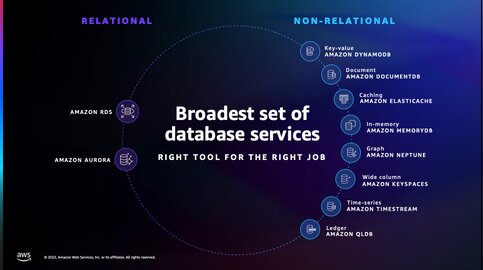
Main AWS database service options
| Workload Need | AWS Database Service |
|---|---|
| Traditional relational database | Amazon RDS |
| Cloud-native relational database | Amazon Aurora |
| Variable relational workloads | Amazon Aurora Serverless |
| Serverless key-value/document access | Amazon DynamoDB |
| Document database | Amazon DocumentDB |
| In-memory caching | Amazon ElastiCache |
| Durable in-memory database | Amazon MemoryDB |
| Graph relationships | Amazon Neptune |
| Time series data | Amazon Timestream |
| Data warehouse and analytics | Amazon Redshift |
| Cassandra-compatible wide-column workloads | Amazon Keyspaces |
| Ledger-style records | Amazon QLDB |
Amazon RDS: traditional relational workloads
Amazon Relational Database Service (Amazon RDS) is a managed relational database service for MySQL, PostgreSQL, MariaDB, Oracle, or SQL Server.
Use Amazon RDS when the workload needs:
- SQL
- Structured data
- Transactions
- Familiar database engines
- Existing relational database migration
- Traditional business applications
- Lift-and-shift modernization
Amazon Aurora: cloud-native relational workloads
Amazon Aurora is AWS’s cloud-native relational database service compatible with MySQL and PostgreSQL. It is often a better fit than standard relational deployments when performance, availability, and scalability are the primary concerns. Aurora can support business-critical applications that need relational database capabilities with a more cloud-optimized architecture.
Use Amazon Aurora when the workload needs:
- MySQL or PostgreSQL compatibility
- Relational transactions
- Higher availability
- Better scalability
- Read-heavy application patterns
- Cloud-native relational architecture
- Business-critical application support
Amazon Aurora Serverless: variable relational workloads
Amazon Aurora Serverless is useful when the application needs a relational database, but demand is unpredictable or intermittent. Instead of planning around fixed capacity, Aurora Serverless can help workloads scale capacity based on usage patterns.
Use Aurora Serverless when the workload needs:
- Relational database capabilities
- Variable or unpredictable traffic
- Automatic capacity scaling
- Development and test environments
- Intermittent applications
- Lower operational overhead
Amazon DynamoDB: serverless key-value and document workloads
Amazon DynamoDB is a fully managed, serverless NoSQL database designed for low-latency key-value and document access at scale.
Use DynamoDB when the workload needs:
- Key-value access patterns
- Low-latency reads and writes
- High throughput
- Serverless database operations
- Horizontal scale
- User profiles
- Shopping carts
- Session stores
- Gaming, mobile, and IoT-style access patterns
Amazon DocumentDB: document database workloads
Amazon DocumentDB is designed for document database use cases and supports MongoDB-compatible application patterns. It is useful when applications work naturally with flexible, JSON-like data instead of rows and tables.
Use Amazon DocumentDB when the workload needs:
- Document-style data
- Flexible schema
- JSON-like application data
- Content management
- Product catalogs
- User-generated content
- MongoDB-compatible application patterns
Amazon ElastiCache: in-memory caching
Amazon ElastiCache is used for in-memory caching and low-latency data access.
Use Amazon ElastiCache when the workload needs:
- Faster read performance
- Session storage
- Caching frequently accessed data
- Reduced load on the primary database
- Low-latency application performanc
Amazon MemoryDB: durable in-memory workloads
Amazon MemoryDB is a Valkey- and Redis OSS-compatible, durable, in-memory database service that delivers ultra-fast performance.
Use Amazon MemoryDB when the workload needs:
- Redis-compatible performance
- Durable in-memory data
- Ultra-low-latency reads
- Real-time applications
- Leaderboards
- Streaming-style use cases
- High-speed transactional workloads
Amazon Neptune: graph database workloads
Amazon Neptune is a fast, fully managed database service powering graph use cases such as identity graphs, knowledge graphs, and fraud detection. Neptune is a strong fit when the relationships between data points matter as much as the data itself.
Use Amazon Neptune when the workload needs:
- Relationship-heavy queries
- Fraud detection
- Recommendation engines
- Knowledge graphs
- Identity graphs
- Social graph patterns
- Network and dependency mapping
Amazon Redshift: data warehouse and analytics
Amazon Redshift is a fast, fully managed cloud data warehouse that makes it simple and cost-effective to analyze all your data.
Use Amazon Redshift when the workload needs:
- Data warehousing
- Business intelligence
- Reporting
- Large-scale analytics
- Aggregations across large datasets
- Analytical queries across structured data
Amazon Timestream: time series data
Timestream offers fully managed, purpose-built time-series database engines for workloads from low-latency queries to large-scale data ingestion.
Use Amazon Timestream when the workload needs:
- Metrics
- IoT telemetry
- Application monitoring data
- Time-stamped events
- Operational analytics
- Time-based queries
Amazon Keyspaces: Cassandra-compatible wide-column workloads
Amazon Keyspaces (for Apache Cassandra) is a scalable, highly available, and managed Apache Cassandra-compatible database service.
Use Amazon Keyspaces when the workload needs:
- Cassandra compatibility
- Wide-column data model
- High-scale distributed application patterns
- Existing Cassandra migration
- Managed operations instead of self-managed Cassandra
Amazon QLDB: ledger-style records
Amazon Quantum Ledger Database (QLDB )is a fully managed ledger database that maintains a complete, immutable record of every change committed to the database
Use Amazon QLDB when the workload needs:
- Immutable transaction history
- Verifiable data changes
- Audit-style records
- Systems where change history matters
- Trusted records without building a custom audit trail
Common pitfalls when choosing AWS database services
1. Choosing RDS by default for every workload
Amazon RDS is excellent for relational workloads, but not every workload is relational. Some applications are better suited to DynamoDB, DocumentDB, Neptune, Timestream, or Redshift.
2. Using DynamoDB without clear access patterns
DynamoDB works best when the access patterns are understood early. Poor data modeling can lead to complexity later.
3. Ignoring caching opportunities
Some performance issues can be solved with ElastiCache rather than over-scaling the primary database.
4. Overlooking backup and recovery requirements
Database choices should account for recovery point objectives, recovery time objectives, replication, retention, and restore needs.
5. Ignoring security and compliance
Database architecture should align with identity, encryption, network access, data residency, privacy, and regulatory requirements.
6. Separating database decisions from cost planning
Storage, read/write capacity, replicas, backups, snapshots, data transfer, and scaling behavior all affect cost.
Database choices should follow the data model
For SMEs, the best AWS database decision is not about choosing the most popular service. It is about aligning the database with the workload’s data model, access patterns, performance needs, security requirements, and operational capacity.
A relational application may belong on Amazon RDS or Amazon Aurora.
A high-scale key-value workload may fit Amazon DynamoDB.
A document-style workload may fit Amazon DocumentDB.
A relationship-heavy workload may need Amazon Neptune.
A time-based telemetry workload may fit Amazon Timestream.
An analytics workload may belong on Amazon Redshift.
A performance issue may need Amazon ElastiCache rather than a larger database instance.
The wrong database choice can create cost, complexity, and migration challenges later. The right choice creates a stronger foundation for performance, resilience, and growth.
Practical next step
Before choosing an AWS database service, create a workload profile.
Include:
- Data model
- Query patterns
- Transaction requirements
- Read/write volume
- Latency requirements
- Traffic predictability
- Backup and recovery requirements
- Availability needs
- Security and compliance requirements
- Migration constraints
- Cost sensitivity
- Team operating capacity
This makes the database decision more practical and less dependent on guesswork.
Need help choosing the right AWS database service?
Reputiva helps organizations assess, secure, modernize, and optimize cloud environments across AWS, Azure, and GCP.
Book a consultation with Reputiva to assess your cloud readiness, database strategy, security posture, or modernization roadmap.