Microsoft’s security portfolio can appear complex at first glance. Microsoft’s security portfolio is an integrated, AI-driven ecosystem organized into core product lines designed to secure identities, endpoints, cloud environments, and data.
There are separate products and portals for identity, endpoint management, threat detection, data security, security operations, and compliance. Names such as Microsoft Entra, Microsoft Defender, Microsoft Intune, Microsoft Purview, and Microsoft Sentinel are often discussed independently, even though their real value increasingly comes from how they work together.
That integration is the starting point for Week 1 of our Securing the Microsoft Cloud series.
At a high level:
- Microsoft Entra ID: Manages identity and access, including multi-factor authentication and Conditional Access policies.
- Microsoft Defender XDR: Provides extended detection and response across endpoints, identities, email, and cloud apps.
- Microsoft Sentinel: Acts as a cloud-native security information and event management (SIEM) tool for real-time threat analytics.
- Microsoft Purview & Priva: Handles data governance, compliance, risk mitigation, and privacy management.
- Microsoft Intune: Controls endpoint management and device security policies.
Why Understanding the Ecosystem Matters
Organizations rarely experience attacks within a single technology boundary.
- A phishing attack might begin with an email.
- The attacker may steal a user’s credentials and attempt to authenticate from an unfamiliar location.
- Those credentials could then be used to access Microsoft Teams, SharePoint Online, or another SaaS application.
- If the attacker compromises an endpoint, they may attempt to steal credentials, escalate privileges, or perform lateral movement.
- Sensitive information may subsequently be downloaded, shared externally, or exfiltrated.
Each stage involves a different security problem.
That means effective protection requires several security capabilities working together:
Identity → Device → Application → Data → Detection → Investigation → Response
This is where Microsoft’s security ecosystem begins to make more sense.
The Microsoft Security Ecosystem at a Glance
| Security Domain | Microsoft Platform | Primary Role |
|---|---|---|
| Identity & Access | Microsoft Entra | Authentication, authorization, identity governance and access control |
| Endpoint & Device Management | Microsoft Intune | Device management, application management and compliance |
| Threat Protection & XDR | Microsoft Defender | Prevention, detection, investigation and response |
| Data Security & Governance | Microsoft Purview | Data discovery, classification, protection, governance and compliance |
| SIEM & Security Operations | Microsoft Sentinel | Security data collection, analytics, hunting, automation and response |
Microsoft Entra: Identity and Access
Microsoft Entra ID, formerly Azure Active Directory, is Microsoft’s cloud identity and access management solution that prevents identity attacks, secures access across cloud and on-premises apps and resources for any user on any device. It controls how users sign in, how access is granted, how multi-factor authentication is enforced, how applications are protected, and how organizations manage identity risk across Microsoft 365, Azure, SaaS apps, and business systems.
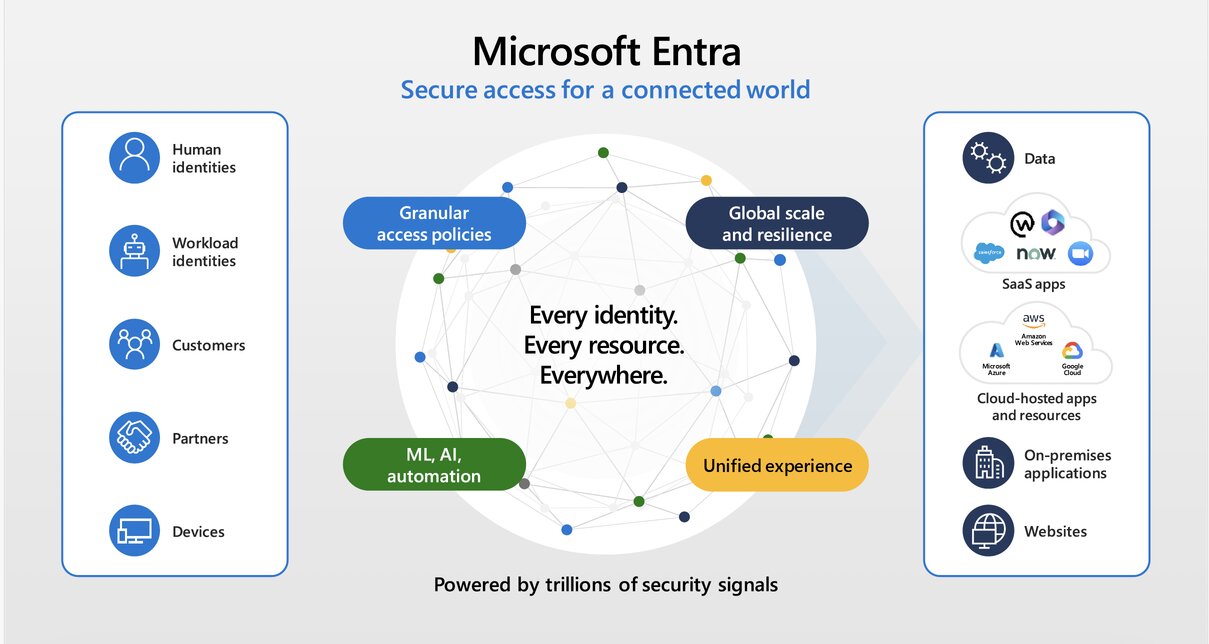
The wider Microsoft Entra family also includes capabilities such as:
- Microsoft Entra ID Protection
- Microsoft Entra ID Governance
- Microsoft Entra External ID
- Workload identity capabilities
- Network access capabilities
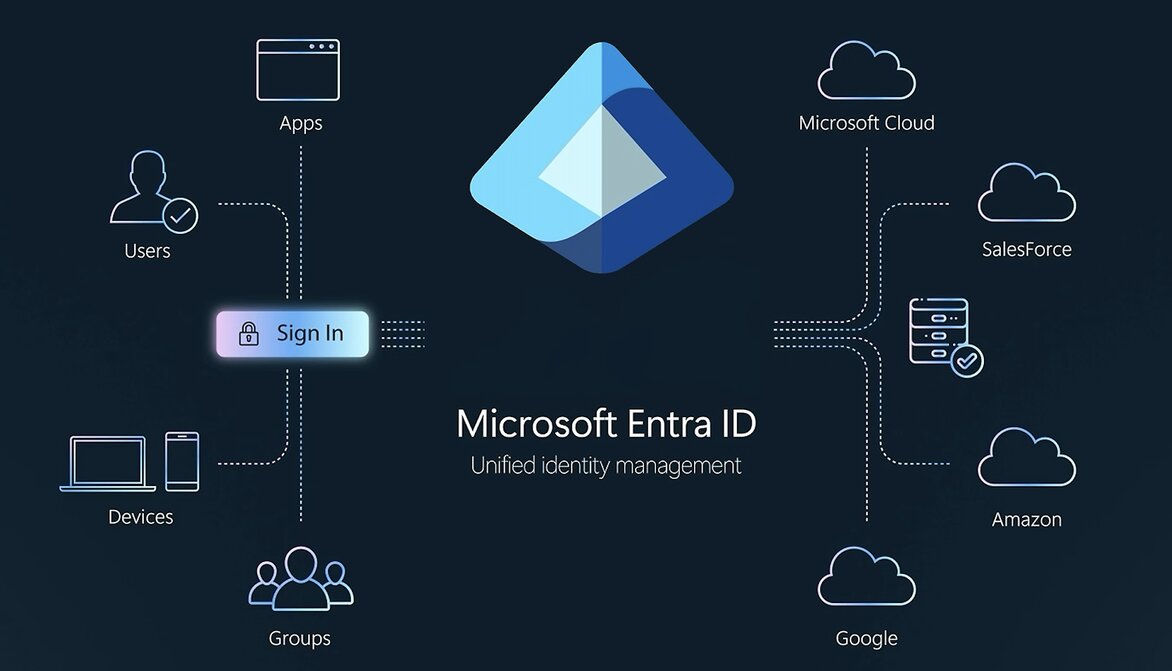
Entra can evaluate:
User identity → authentication strength → device state → location → sign-in risk → application → access policy
Microsoft Intune: Devices and Applications
Microsoft Intune is Microsoft’s cloud-based endpoint management service. It can enroll, configure, secure, update, and manage organizational devices and applications across platforms, including Windows, macOS, Linux, Android, and iOS/iPadOS.
Intune supports both:
- Mobile Device Management (MDM)- managing the device itself. and
- Mobile Application Management (MAM) – protecting corporate applications and data, including scenarios where the organization does not fully manage the device.
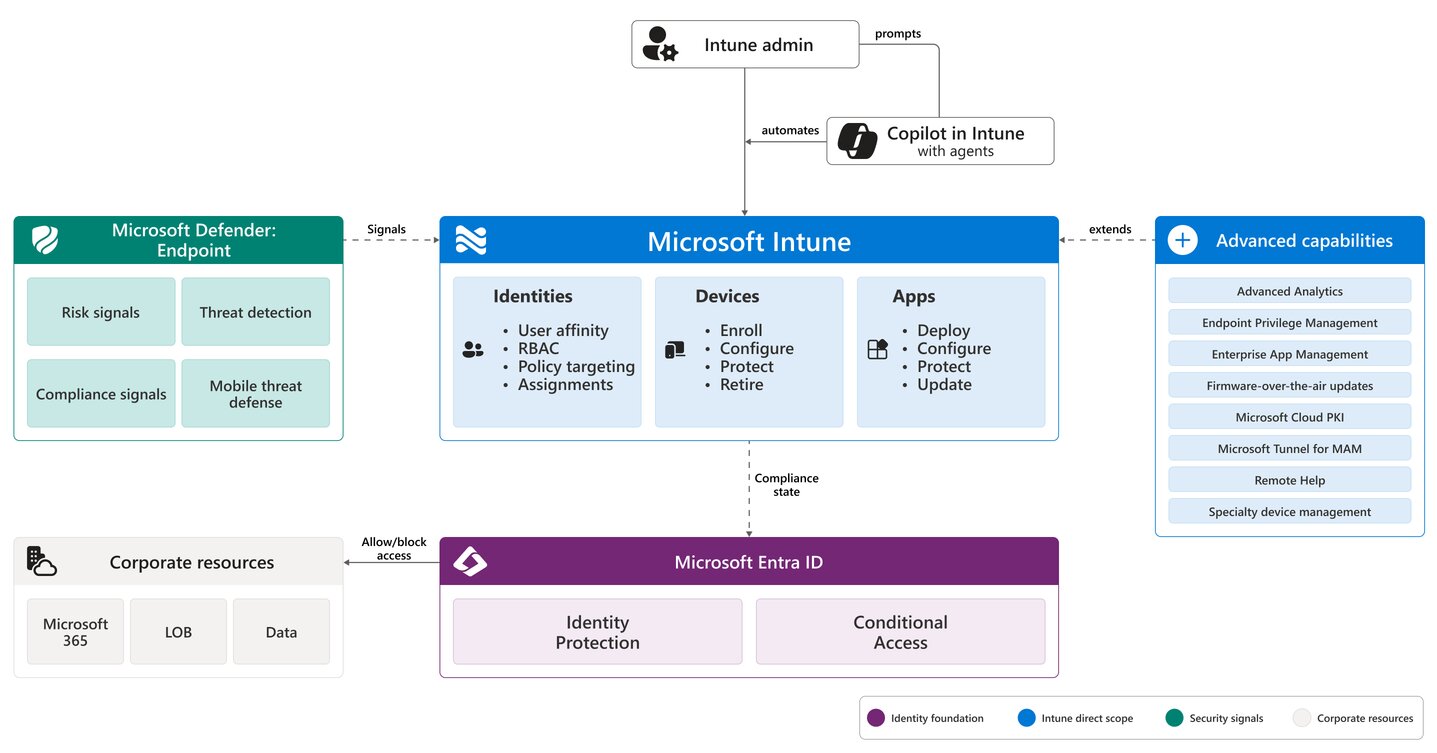
Organizations can use Intune to implement:
- Device configuration policies
- Compliance policies
- Endpoint security settings
- Application deployment
- Application protection policies
- Security baselines
- Encryption requirements
- Operating-system requirements
- Device restrictions
Microsoft Defender: Threat Protection and XDR
Microsoft Defender is a cross-platform security suite built to protect personal devices, business networks, and enterprise data against malware, phishing, and other cyber threats. Microsoft is a family of security capabilities covering several attack surfaces.
Major components include:
- Microsoft Defender for Endpoint
- Microsoft Defender for Office 365
- Microsoft Defender for Identity
- Microsoft Defender for Cloud Apps
- Microsoft Defender XDR
Each protects a different part of the environment.
Protects endpoints and provides capabilities such as endpoint detection and response, attack surface reduction, investigation, and remediation.
Protects Microsoft 365 communication and collaboration workloads against phishing, malicious links, attachments, and other threats.
Uses identity-related signals to detect compromised accounts, reconnaissance, lateral movement, and other identity attacks.
Provides visibility and controls around SaaS applications, cloud app usage, OAuth applications, Shadow IT, and cloud-based threats.
Microsoft Defender XDR: Connecting the Attack Story
Microsoft Defender XDR is a unified security platform that collects, correlates, and analyzes threat data and signals across an organization’s endpoints, identities, email, and cloud applications.
Defender XDR coordinates security across endpoints, identities, email, Microsoft 365 services, and SaaS applications, consolidating threat signals so incidents can be investigated from the Microsoft Defender portal.
Microsoft Purview: Protecting the Data
Microsoft Purview is a unified data governance, risk, and compliance solution that helps organizations secure and manage data across their entire digital estate.
Purview includes capabilities such as:
- Information Protection, Sensitivity labels, Data Loss Prevention, Insider Risk Management
- Data Lifecycle Management, Records Management, Audit, eDiscovery
- Communication Compliance, Data Security Posture Management
Microsoft Sentinel: SIEM and Security Operations
Microsoft Sentinel is Microsoft’s cloud-native Security Information and Event Management platform. It collects security data across users, devices, applications, infrastructure, on-premises systems, multiple cloud platforms, and third-party security technologies.
Sentinel capabilities include
- Data ingestion, Security analytics, Threat detection, Incident investigation
- Threat hunting, Threat intelligence, User and Entity Behaviour Analytics
- Automation, Playbooks, Security orchestration and response.
Defender XDR vs Microsoft Sentinel
Microsoft Defender XDR
Focuses primarily on detecting and correlating attacks across Microsoft’s protection domains.
Microsoft Sentinel
Provides broader SIEM visibility and security operations across the enterprise.
Zero Trust Connects the Ecosystem
Zero Trust is a modern security strategy and architectural approach based on the principle of never trust, always verify. Microsoft’s approach follows three core principles: Verify explicitly, Use least privilege access and Assume breach. Those principles map naturally across the ecosystem.
Verify Explicitly
Microsoft Entra evaluates identities, authentication, risk, and access context.
Use Least Privilege
Entra governance, Privileged Identity Management, and access controls limit unnecessary permissions.
Assume Breach
Microsoft Defender detects malicious activity and helps contain attacks.
A Useful Mental Model
When evaluating Microsoft’s security ecosystem, remember the five questions:
| Question | Platform |
|---|---|
| Who or what is requesting access? | Microsoft Entra |
| Is the device trusted and compliant? | Microsoft Intune |
| Is malicious activity occurring? | Microsoft Defender |
| What information needs protection? | Microsoft Purview |
| What is happening across the entire environment? | Microsoft Sentinel |
Think Security Architecture, Not Product List
The Microsoft security ecosystem can look overwhelming when approached as a catalogue of products: Entra, Intune, Defender, Purview and Sentinel. Each contains additional products, portals, policies, licenses, and capabilities. But the architecture becomes much clearer when each technology is associated with a security question:
- Who are you?
- What are you accessing?
- What device are you using?
- Should you be allowed access?
- Is that device or identity compromised?
- What information are you accessing?
- Is the activity suspicious?
- What else is happening across the organization?
The objective should not be to deploy every Microsoft security product available.
The objective should be to create a coherent security architecture where identity, endpoint, application, data, detection, and response controls reinforce one another.
That is the foundation on which the rest of this 52-week series will build.