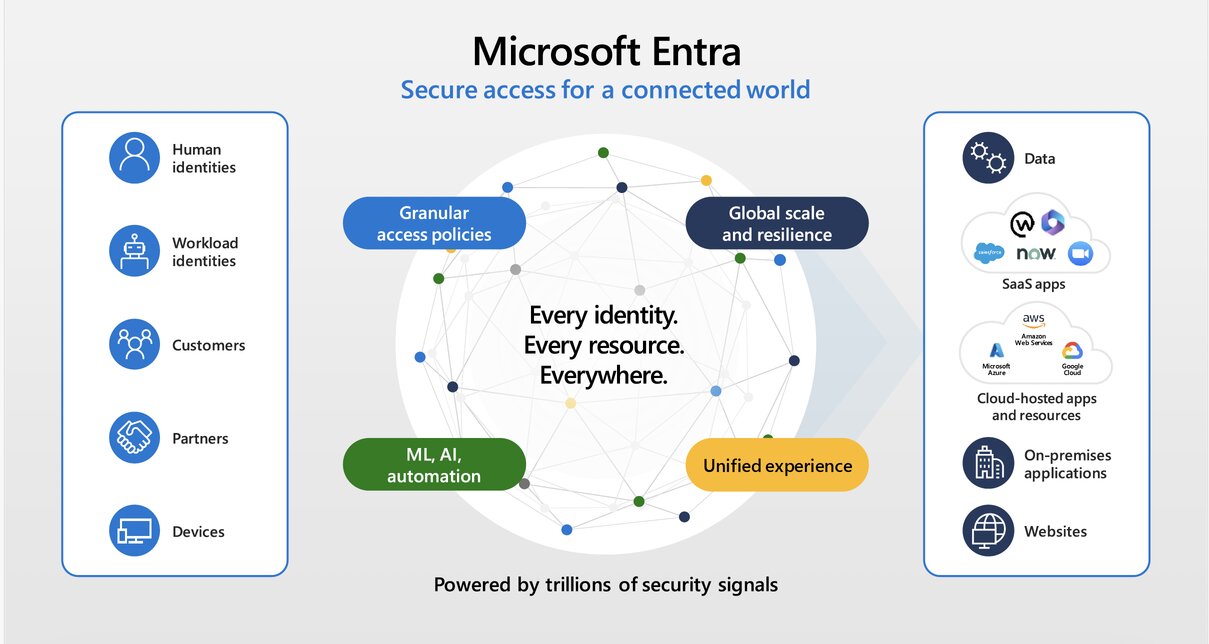
Microsoft Entra ID, formerly Azure Active Directory, is Microsoft’s cloud identity and access management solution that prevents identity attacks, secures access across cloud and on-premises apps and resources for any user on any device. It controls how users sign in, how access is granted, how multi-factor authentication is enforced, how applications are protected, and how organizations manage identity risk across Microsoft 365, Azure, SaaS apps, and business systems.
Entra ID is built on zero-trust principles, helping organizations protect access to resources and data through strong authentication and real-time, risk-based, adaptive access policies without compromising the user experience.
Choosing the right Entra ID license matters because different plans unlock different levels of identity protection, Conditional Access, privileged access, governance, automation, and Zero Trust capabilities.
Microsoft Entra licensing options include Microsoft Entra ID Free, Microsoft Entra ID P1, Microsoft Entra ID P2, Microsoft Entra Suite, Microsoft Entra External ID, Microsoft Entra Workload ID, and Microsoft Entra ID Governance, and it is also included in Microsoft 365 and Enterprise Mobility + Security plans.
What Is Microsoft Entra ID?
Microsoft Entra ID is Microsoft’s identity and access management solution for employees, administrators, devices, applications, and external users. It. It helps organizations manage User identities, groups, and roles; single sign-on; multi-factor authentication; conditional access; identity risk; privileged access; guest and external access; application access; and identity governance.
Microsoft Entra ID Licensing Options
Best for: Very small organizations or basic Microsoft 365/Azure identity management.
Microsoft Entra ID Free is the foundational identity and access management service included with any Microsoft online business service (such as Microsoft 365 or Azure). It provides core capabilities like user/group management, cloud Single Sign-On (SSO) for Microsoft services, and basic directory reports.
When you create a free account, there’s no other action required from you. Microsoft Entra ID Free is automatically added to your billing account. You aren’t charged for the product and it’s a free product. It remains active as long as your billing account is active.
Use Entra ID Free when:
Your organization only needs basic identity management, users and groups, basic SSO,
Avoid relying only on Entra ID Free when:
You need Conditional Access, advanced security controls, risk-based identity protection, access reviews, privileged identity management or a stronger Zero Trust implementation.
Microsoft Entra ID P1
Best for: Organizations that need Conditional Access, stronger access control, and modern identity security.
Microsoft Entra ID P1 (formerly Azure AD P1) is an advanced cloud-based identity and access management (IAM) tier. It adds enterprise-grade hybrid identity, automated lifecycle management, and granular security controls (like Conditional Access) to the foundational capabilities of the free tier.
Microsoft Entra ID P1 is available as a standalone or included with Microsoft 365 E3 for enterprise customers and Microsoft 365 Business Premium for small to medium businesses.
Use Entra ID P1 when you need: Conditional Access, Multi-factor authentication policies, Hybrid identity capabilities, Self-service password reset controls, Dynamic groups, Group-based access management, Application access control or a stronger Zero Trust foundation.
Best fit:
- Small and medium-sized businesses using Microsoft 365 Business Premium
- Mid-market organizations using Microsoft 365 E3
Microsoft Entra ID P2
Best for: Organizations that need identity risk detection, privileged access management, and stronger identity security operations.
Microsoft Entra ID P2 (formerly Azure AD Premium P2) is Microsoft’s most advanced identity and access management tier. It builds upon P1 features by adding automated identity governance and risk-based security. Microsoft Entra ID Protection is a feature of the Microsoft Entra ID P2 plan that helps organizations protect, detect, and remediate compromised identities.
Entra ID P2 is available as a standalone or as part of Microsoft 365 E5 for enterprise customers.
Use Entra ID P2 when you need: Identity Protection, Risk-based Conditional Access, Privileged Identity Management, Access reviews, Stronger admin protection, Detection of risky users and risky sign-ins, Better identity security visibility and More mature identity governance.
Best fit: Enterprises, Regulated organizations, Financial services, Healthcare, Government and public sector, Organizations with many administrators, high-risk or sensitive data, external users, partners, and privileged roles.
Microsoft Entra ID Governance
Best for: Organizations that need structured identity lifecycle management, access reviews, entitlement management, and joiner/mover/leaver automation.
Prerequisite: You need a base Microsoft Entra ID P1 (or a package that includes it, such as Microsoft 365 E3) assigned to your users to use Entra ID Governance.
Microsoft Entra ID Governance leverages AI-driven insights to help organizations automatically ensure that the right people have the right access to the right resources.
Use Entra ID Governance when you need: Joiner, mover, leaver workflows, Entitlement management, Access packages, Access reviews
Lifecycle workflows. Automated access assignment and removal, Better control over guest and partner access, Governance over sensitive applications and groups
Best fit: Organizations with frequent onboarding and offboarding, many contractors or partners, compliance requirements, complex access approval workflows, or a need for periodic access certification.
Best for: Organizations that want a broader identity and network access security platform.
Prerequisite: A subscription to Microsoft Entra ID P1 or a package that includes it is required.
Microsoft Entra Suite combines identity protection, identity governance, network access, and identity verification capabilities.
Use Microsoft Entra Suite when you need: Identity protection, Identity governance, Secure access to private apps, Secure access to internet and SaaS apps, Identity verification, and a broader Zero Trust access strategy, Converged identity and network access controls
Best fit: Organizations modernizing remote access, moving away from legacy VPN models, implementing Zero Trust Network Access, or want stronger control over identity, access, and network security
Common Entra ID Licensing Mistakes
1. Thinking Microsoft 365 automatically includes all Entra features
Many organizations assume that because they use Microsoft 365, they already have all Entra ID capabilities. They do not. Some identity features require Entra ID P1, P2, Governance, or Suite licensing.
2. Using Entra ID Free for a growing business
Entra ID Free may be enough for basic user and group management, but it is not enough for mature access control. Once a business needs Conditional Access, role-based policies, device-based access, or stronger Zero Trust controls, Entra ID P1 becomes important.
3. Not licensing admin and privileged users properly
Admin accounts are among the highest-risk identities in any organization. Even if an organization does not license everyone with P2, it should seriously consider P2 for administrators and privileged users.
4. Ignoring guest and external user access
Many organizations invite partners, vendors, contractors, and consultants into Teams, SharePoint, and applications. Without governance, guest access can become messy quickly. Access should be reviewed, time-bound, approved, and removed when no longer needed.
5. Buying P2 but not configuring the features
Licensing alone does not improve security. If an organization buys Entra ID P2 but does not configure Identity Protection, privileged identity controls, access reviews, or risk-based policies, the value is lost.
Why Entra ID Licensing Matters
Identity is now one of the most important layers of cybersecurity. Attackers increasingly target user accounts, admin accounts, email access, MFA fatigue, stolen credentials, OAuth apps, and misconfigured permissions. The right Entra ID licensing helps organizations:
- Enforce Conditional Access
- Reduce password-based risk
- Protect privileged accounts
- Detect risky sign-ins
- Govern user access
- Manage external users
- Support Zero Trust
- Secure Microsoft 365 and SaaS applications
- Improve audit and compliance readiness
- Prepare for AI and Copilot adoption
Identity Is the New Security Perimeter
For modern organizations, identity has become the new security perimeter. Employees may work from anywhere. Applications may live in Microsoft 365, Azure, AWS, GCP, SaaS platforms, and private environments. Devices may be corporate-owned, personal, mobile, or unmanaged. External users may include contractors, vendors, partners, and consultants.
In this environment, the question is not only whether users can sign in. The real question is whether the organization can answer:
Who has access?
Should they have access?
What device are they using?
Where are they signing in from?
Is the sign-in risky?
Is the user privileged?
Should access be temporary?
Who approved the access?
When should access be reviewed or removed?
That is why Entra ID licensing should be aligned to business risk, regulatory exposure, admin privileges, sensitive data, and Zero Trust maturity.
Entra ID is not just a login system. It is the identity foundation for secure cloud adoption, Microsoft 365 protection, AI readiness, and modern business resilience.
Need Help Choosing the Right Microsoft Entra ID License?
Reputiva helps organizations assess their Microsoft Entra ID environment, identify licensing gaps, strengthen Conditional Access, protect privileged accounts, improve identity governance, and prepare for secure adoption of Microsoft 365 and Copilot.
Whether you are using Microsoft 365 Business Premium, Microsoft 365 E3, Microsoft 365 E5, or standalone Entra ID licenses, we can help you choose the right identity security model for your organization.
Book a Microsoft Entra ID Security & Licensing Assessment today