Identity is the new cloud perimeter. IAM decisions affect security, compliance, operations, incident response, application architecture, and business risk. AWS provides multiple identity services for different use cases, including AWS Identity and Access Management, IAM Identity Center, Amazon Cognito, and Amazon Verified Permissions.
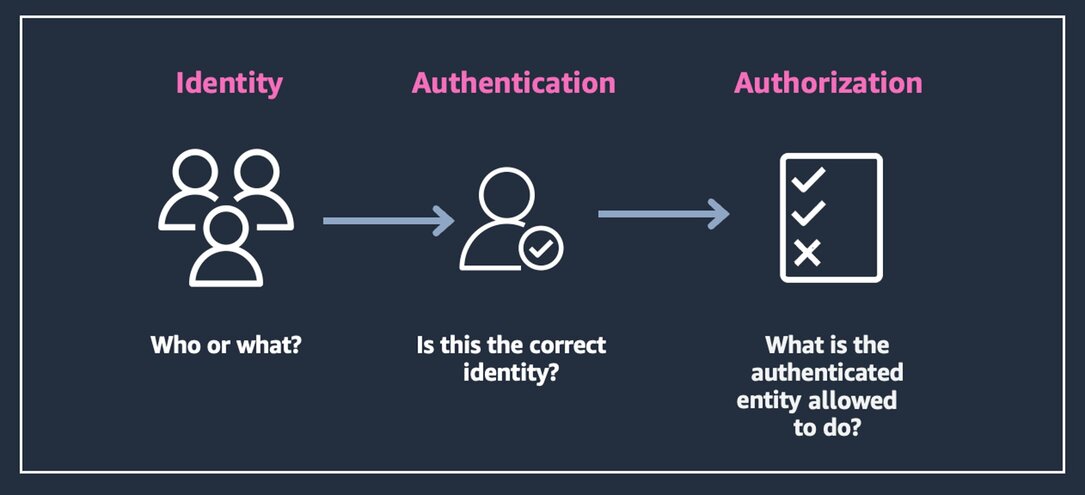
Identity and access management helps ensure that only authenticated and authorized users can access the cloud resources they need to perform their tasks, and that they can do so in a secure and compliant way.
Why AWS IAM decisions matter
Identity and access management (IAM) controls who and what can access AWS resources, applications, workloads, APIs, data, and administrative functions. The wrong IAM design can create overprivileged users, long-lived credentials, unmanaged access keys, weak auditability, unclear ownership, and unnecessary security exposure.
The right IAM design supports:
- Authentication
- Authorization
- Least privilege
- Privileged access control
- Workforce access
- Customer identity
- Workload identity
- Service-to-service access
- Federation and single sign-on
- Cross-account access
- Auditability and compliance
- Incident response
- Operational risk reduction
Start with the identity type, not the service name
Before choosing an AWS IAM service, ask:
- Is the identity a human user, workload, application, service, customer, partner, or administrator?
- Is the access for AWS resources or application users?
- Is this workforce access or customer identity?
- Does the workload need federation with an external identity provider?
- Does access need MFA or context-aware controls?
- Does access need to be permanent, temporary, or just-in-time?
- Are permissions broad, resource-level, or fine-grained inside an application?
- Does the workload need cross-account access?
- How will access be reviewed, logged, and removed?
- What are the compliance and audit requirements?
The better question is not simply, “Which AWS IAM service should we use?”
The better question is:
Who or what needs access, to which resource, under what conditions, and for how long?
AWS IAM service options
| IAM Need | AWS Service |
|---|---|
| AWS resource access control | AWS Identity and Access Management |
| Workforce SSO and multi-account access | IAM Identity Center |
| Customer identity and app sign-in | Amazon Cognito |
| Fine-grained application authorization | Amazon Verified Permissions |
| Multi-account governance and guardrails | AWS Organizations / Service Control Policies |
| Permissions analysis and least privilege | IAM Access Analyzer |
| Temporary credentials and federation | AWS Security Token Service |
| Resource-level authorization | Resource policies / identity-based policies |
AWS Identity and Access Management: AWS resource access control
AWS IAM (Identity and Access Management is a web service that helps you safely control who can sign in and use your Amazon Web Services resources. It manages access with users, groups, roles, and JSON permission policies.
Use AWS IAM when the workload needs: Access to AWS services and resources; IAM roles; IAM policies; Resource-level permissions; Service-to-service access; Programmatic access; Cross-account roles; Least-privilege permissions; and Permission boundaries.
IAM Identity Center: workforce access to AWS accounts and applications
AWS IAM Identity Center (formerly AWS Single Sign-On) is a central service to manage workforce access to multiple AWS accounts, cloud applications, and external tools. IAM Identity Center is the preferred AWS service for workforce access across AWS accounts and applications.
Use IAM Identity Center when the workload needs: Centralized workforce access, single sign-on, multi-account access management, permission sets, integration with an external identity provider and AWS Organizations account access.
Amazon Cognito: customer identity and application sign-in
Amazon Cognito is used for application users and customer identity. Implement secure, scalable authentication and access control for users, AI agents, and microservices.
Use Amazon Cognito when the workload needs: Customer authentication, application user registration, user pools, social sign-in, web and mobile app identity, federated sign-in for application users, and token-based authentication.
IAM Identity Center is for workforce access to AWS accounts and applications, while Cognito is for customers or application users to sign in to web and mobile applications.
Amazon Verified Permissions: fine-grained application authorization
Amazon Verified Permissions is for fine-grained permissions and authorization inside custom applications. Amazon Verified Permissions is a fully managed authorization service that uses the Cedar policy language, so you can build more secure applications.
Use Amazon Verified Permissions when the workload needs: Application-level authorization, fine-grained access decisions, role-based application permissions, attribute-based application permissions, policy-based authorization, and centralized authorization logic.
AWS Organizations and Service Control Policies: multi-account governance
AWS Organizations is a free cloud management service that lets you centrally govern and scale multiple AWS accounts, featuring consolidated billing, hierarchical account grouping, and policy-based security guardrails
AWS Service Control Policies (SCPs) are JSON-based guardrails managed through AWS Organizations that set the maximum available permissions for accounts, but they do not grant access on their own.
Use AWS Organizations and SCPs when the workload needs: Multiple AWS accounts, centralized account management, account-level guardrails, service Control Policies, separation of environments, restrictions across accounts and organization-level governance.
IAM Access Analyzer: permissions analysis and least privilege improvement
AWS IAM Access Analyzer is a security tool that helps you set, verify, and refine permissions by identifying external sharing, internal access, and unused credentials using automated reasoning. IAM Access Analyzer helps identify risky access patterns and supports least privilege.
Use IAM Access Analyzer when the workload needs: Public access detection, cross-account access analysis, policy validation, least privilege policy generation, review of unused permissions and external access visibility.
AWS Security Token Service: temporary credentials and federation
AWS Security Token Service supports temporary credential patterns used by IAM roles, federation, and cross-account access.
Use AWS STS when the workload needs: Temporary security credentials, role assumption, cross-account access, federated access, short-lived programmatic access, and reduced reliance on long-lived access keys.
Resource policies and identity-based policies: defining who can access what
Identity-based policies define what an IAM principal can do. Resource-based policies define who can access a specific resource.
Use resource policies and identity-based policies when the workload needs: Identity-based permissions, resource-based permissions, S3 bucket policies, KMS key policies, Lambda resource policies, cross-account access and Service-to-service authorization
Common pitfalls when choosing AWS IAM services
1. Treating IAM as a one-time setup task
Access needs change as users, teams, workloads, accounts, and applications grow. IAM should be reviewed regularly, not only configured at the beginning.
2. Creating IAM users for human access by default
AWS recommends federation and temporary credentials for human users where possible. Long-lived IAM users should not be the default pattern for workforce access.
3. Giving broad administrator access too early
Overprivileged access increases blast radius and incident impact.
4. Confusing workforce identity with customer identity
IAM Identity Center is for workforce access. Amazon Cognito is for customer or application user identity. Using the wrong service can create architectural and operational confusion.
5. Using long-lived credentials for workloads
Workloads should use roles, temporary credentials, and federation patterns wherever possible. Long-lived access keys increase the risk of credential management.
6. Ignoring cross-account access design
Growing AWS environments often need a deliberate multi-account strategy, not ad hoc role sharing. Cross-account access should be designed, documented, and monitored.
7. Separating IAM from monitoring and audit
Identity decisions should be tied to CloudTrail, Access Analyzer, access reviews, and incident response. Access that cannot be monitored is difficult to govern.
8. Not reviewing unused access
Permissions that are easy to grant but never removed become a long-term security risk. Regular review of unused users, roles, permissions, policies, and credentials is part of AWS IAM best practice.
IAM choices should follow the identity and access pattern
For SMEs, the best AWS IAM decision is not about choosing the service with the most features. It is about understanding the identity and access pattern.
- A cloud administrator may need IAM Identity Center, MFA, permission sets, and account-level guardrails.
- A workload may need an IAM role, temporary credentials, or cross-account access.
- A customer-facing application may need Amazon Cognito for sign-in and Amazon Verified Permissions for fine-grained authorization.
- A multi-account environment may need AWS Organizations, Service Control Policies, and a clear account structure.
- A sensitive workload may need tighter resource policies, KMS key policies, logging, access reviews, and least privilege analysis.
The wrong IAM design can create privilege sprawl, security gaps, audit issues, and operational risk. The right IAM design creates a stronger foundation for security, compliance, resilience, and cloud growth.
Practical next step
Before choosing an AWS IAM service, create an access profile.
Include:
- Identity type
- Workforce, customer, partner, workload, or administrator access
- AWS resource access or application-level access
- Required permission scope
- MFA or federation requirements
- Temporary credential requirements
- Privileged access requirements
- Cross-account access requirements
- Resource policy requirements
- Logging and audit requirements
- Access review and offboarding process
- Compliance requirements
- Team operating capacity
This makes IAM decisions more practical and less dependent on guesswork.
Need help choosing the right AWS IAM service?
Reputiva helps organizations assess, secure, modernize, and optimize cloud environments across AWS, Azure, and GCP.
Book a consultation with Reputiva to assess your cloud readiness, IAM strategy, security posture, or modernization roadmap.