In modern cloud environments, identity is no longer just a login layer; it is a core security control. IAM decisions affect security, compliance, operations, incident response, application architecture, and business risk.
Microsoft Azure workloads need more than just compute, storage, databases, and networking. They also need clear answers on who can access what, which workloads can communicate with which services, how privileges are granted, how customer identities are managed, and how access is monitored over time.
Why Azure IAM decisions matter
Identity and access management controls who and what can access Azure resources, applications, workloads, APIs, data, and administrative functions.
The wrong IAM design can create overprivileged users, exposed secrets, unmanaged service principals, excessive application permissions, weak authentication, audit gaps, and unnecessary security risk.
The right IAM design supports:
- Authentication
- Authorization
- Least privilege
- Workforce access
- Customer identity
- Workload identity
- Application identity
- Service-to-service access
- Federation and single sign-on
- Conditional Access
- Privileged access
- Access lifecycle governance
- Auditability and compliance
- Incident response
- Operational risk reduction
Start with the identity type, not the service name
Before choosing a Microsoft Azure IAM service, ask:
- Is the identity a human user, workload, application, service principal, managed identity, customer, partner, or administrator?
- Is the access for Azure resources or application users?
- Is this workforce access or customer identity?
- Does the workload need federation with an external identity provider?
- Does the workload need managed identity or service principal access?
- Can long-lived secrets be avoided?
- Does access need MFA, Conditional Access, or device compliance controls?
- Does access need to be permanent, temporary, or just-in-time?
- Are permissions broad, subscription-level, resource group-level, or resource-level?
- Does the workload need cross-subscription or multi-tenant access?
- How will access be reviewed, logged, and removed?
- What are the compliance and audit requirements?
The better question is not simply, “Which Azure IAM service should we use?” The better question is:
Who or what needs access, to which resource, under what conditions, and for how long?
Main Microsoft Azure IAM service options
| IAM Need | Microsoft Azure Service |
|---|---|
| Workforce identity and authentication | Microsoft Entra ID |
| Azure resource authorization | Azure RBAC |
| Workload identity without secrets | Managed Identities |
| Just-in-time privileged access | Microsoft Entra PIM |
| Context-aware access policies | Conditional Access |
| Customer, partner, and guest identity | Microsoft Entra External ID |
| Application identity and SSO integration | App registrations / Enterprise applications |
| Automation and non-human identity | Service principals |
| Workload identity governance | Microsoft Entra Workload ID |
| Access lifecycle governance | Access reviews / Entitlement Management |
| Azure governance guardrails | Management Groups / Azure Policy |
| Entitlement visibility and cleanup | Microsoft Entra Permissions Management |
Microsoft Entra ID: workforce identity and authentication
Microsoft Entra ID (formerly Azure Active Directory or Azure AD) is a cloud-based identity and access management service. It controls user logins, single sign-on (SSO), and security policies like multi-factor authentication (MFA) across Microsoft 365, Azure, and external apps.
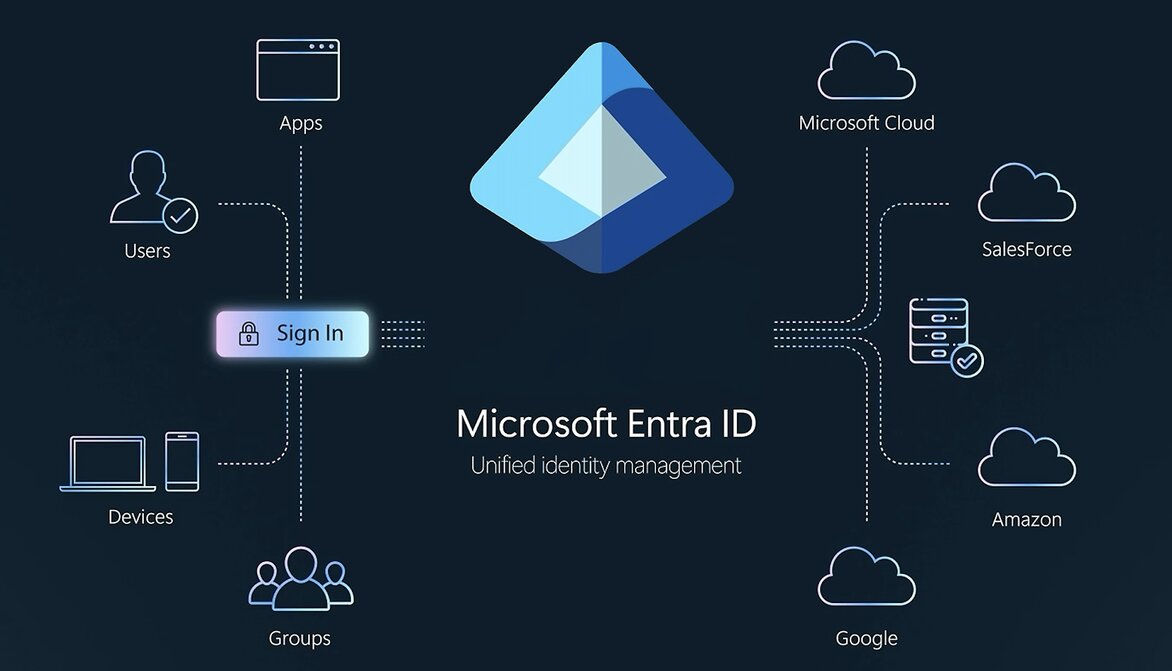
Use Microsoft Entra ID when the workload needs: User and group identity, authentication, single sign-on, MFA, conditional Access, device-based access signals, Microsoft 365 and Azure identity foundation and Integration with external identity providers.
Microsoft Entra ID helps organizations manage user identities and control access to apps, data, and resources.
Azure RBAC: authorization to Azure resources
Azure Role-Based Access Control (Azure RBAC) is an authorization system built on Azure Resource Manager that manages who has access to Azure resources and what they can do. Access is granted by creating a role assignment combining a security principal, a role definition, and a scope.
Use Azure RBAC when the workload needs Subscription-level access, resource group-level access, resource-level permissions, built-in roles, custom roles, least-privilege access, separation of duties, and delegated administration.
Azure RBAC helps manage who has access to Azure resources, what they can do with those resources, and what scope that access applies to.
Managed Identities: workload identity without secrets
A managed identity is a secure cloud feature that provides an automatic identity for applications in Microsoft Entra ID. Managed identities allow Azure resources to authenticate to supported services without manually managing credentials.
Use managed identities when the workload needs: Azure service access without stored credentials, secretless authentication, VM, App Service, Functions, Logic Apps, or AKS workload identity, service-to-service access, reduced credential management, and application identity for Azure-hosted workloads.
Microsoft Entra Privileged Identity Management: just-in-time privileged access
Microsoft Entra Privileged Identity Management (PIM) is a service within Microsoft Entra ID that enables you to manage, control, and monitor access to critical resources across your organization.
Use Microsoft Entra PIM when the workload needs: Just-in-time admin access, approval-based elevation, time-bound privileged roles, privileged role monitoring, alerts for role changes, access reviews and reduced standing privileges
Conditional Access: context-aware access policies
Conditional Access is a Zero Trust security tool used by platforms like Microsoft Entra ID. It acts as an if-then rule engine. It evaluates real-time signals—such as user identity, device health, location, and risk level—before granting access to apps and data.
Conditional Access helps enforce access decisions based on identity-driven signals.
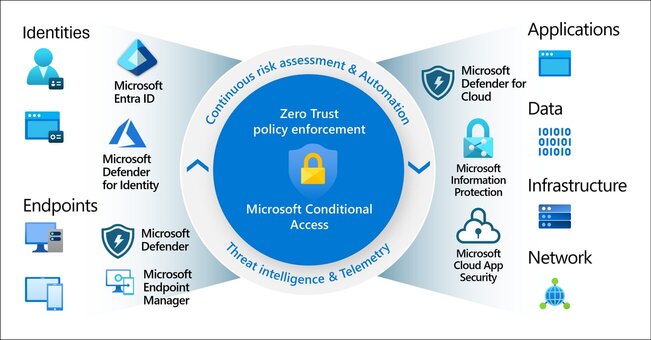
Use Conditional Access when the workload needs: MFA enforcement, location-based controls, device compliance controls, risk-based access, session controls, app-based access conditions and stronger access policy enforcement.
Microsoft Entra External ID: customer, partner, and guest identity
With Microsoft Entra External ID, you can allow external identities to securely access your apps and resources.
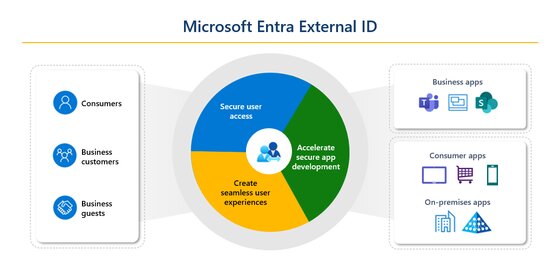
Use Microsoft Entra External ID when the workload needs: Customer identity, partner access, guest user access, B2B collaboration, B2C application sign-in, external user authentication, and app sign-in for non-employees
App registrations and enterprise applications: application identity and SSO integration
App registrations and enterprise applications support application identity, authentication, and integration with Microsoft Entra ID.
Use app registrations and enterprise applications when the workload needs: Application authentication, OAuth and OpenID Connect integration, API permissions, service principals, consent management, third-party application access and internal application SSO
Microsoft Entra Workload ID: workload identity governance and protection
Microsoft Entra Workload ID helps secure identities for apps and services, as well as their access to cloud resources.
Use Microsoft Entra Workload ID when the workload needs: Service principal governance, managed identity governance, workload identity protection, conditional Access for workload identities, identity protection for non-human identities, access reviews for workload identities
Access reviews and entitlement management: access lifecycle governance
Access reviews and entitlement management help ensure that access is not only granted but also reviewed, renewed, or revoked.
Management Groups and Azure Policy: governance guardrails
Azure Management Groups organize multiple subscriptions into logical hierarchies. When you assign an Azure Policy at a management group scope, that rule flows downward. Every child management group, subscription, and resource under that node inherits the policy, allowing large teams to enforce rules at scale.
Microsoft Entra Permissions Management: entitlement visibility and cleanup
Microsoft Entra Permissions Management helps identify excessive permissions and entitlement risk across cloud environments.
Service principals: non-human application and automation access
Service principals represent application or automation identities.
Common pitfalls when choosing Azure IAM services
1. Treating IAM as a one-time setup task
Access needs change as users, teams, workloads, subscriptions, applications, and external relationships grow. IAM should be reviewed regularly, not only configured at the beginning.
2. Assigning broad Owner or Contributor access too early
Broad access at the subscription or resource group level can create privilege sprawl and increase blast radius. Least privilege should guide role assignment from the beginning.
3. Confusing Microsoft Entra ID with Azure RBAC
Microsoft Entra ID authenticates identities. Azure RBAC authorizes access to Azure resources. Both are needed, but they solve different problems.
4. Using service principal secrets when managed identities or federation are better
Long-lived secrets increase credential exposure risk. Azure-hosted workloads should use managed identities where possible, and external automation should use stronger credential patterns where supported.
5. Ignoring privileged access management
Standing admin access should be minimized, monitored, and reviewed. PIM helps reduce standing privilege by supporting just-in-time access patterns.
6. Not using Conditional Access for sensitive access
MFA, device compliance, location, and risk-based policies are critical for protecting accounts and cloud management access. Conditional Access should be part of the IAM design for sensitive workloads and privileged roles.
7. Not reviewing access over time
Access reviews, entitlement management, and offboarding are essential for lifecycle governance. This is especially important for privileged roles, external users, contractors, and sensitive applications.
IAM choices should follow the identity and access pattern
For SMEs, the best Azure IAM decision is not about choosing the service with the most features. It is about understanding the identity and access pattern.
- A cloud administrator may need Microsoft Entra ID, Conditional Access, Azure RBAC, PIM, and access reviews.
- A workload may need a managed identity, service principal, federated credential, or workload identity governance.
- A customer-facing application may need Microsoft Entra External ID.
- An internal business application may need app registration, enterprise application configuration, SSO, and consent governance.
- A multi-subscription environment may need Management Groups, Azure Policy, and clear RBAC boundaries.
- A sensitive workload may need stronger Conditional Access, logging, alerting, least privilege, PIM, and periodic access reviews.
The wrong IAM design can create privilege sprawl, weak authentication, excessive app permissions, exposed secrets, audit gaps, and operational risk.
The right IAM design creates a stronger foundation for security, compliance, resilience, and cloud growth.
Practical next step
Before choosing a Microsoft Azure IAM service, create an access profile.
Include:
- Identity type
- Workforce, customer, partner, workload, or administrator access
- Azure resource access or application-level access
- Required permission scope
- Federation or SSO requirements
- Managed identity or service principal requirements
- Secretless authentication options
- MFA and Conditional Access requirements
- Privileged access requirements
- Cross-subscription or multi-tenant access needs
- App permission and consent requirements
- Logging and audit requirements
- Access review and offboarding process
- Compliance requirements
- Team operating capacity
This makes IAM decisions more practical and less dependent on guesswork.
Need help choosing the right Microsoft Azure IAM service?
Reputiva helps organizations assess, secure, modernize, and optimize cloud environments across AWS, Azure, and GCP.
Book a consultation with Reputiva to assess your cloud readiness, IAM strategy, security posture, or modernization roadmap.