Microsoft 365 and Google Workspace are cloud-based Software-as-a-Service (SaaS) productivity and collaboration platforms. Both provide the core tools most organizations need to run daily work: business email, calendars, file storage, document creation, spreadsheets, presentations, video meetings, chat, security controls, admin management, and now AI-powered assistance.
Microsoft 365 is the evolution of Office 365, Microsoft’s cloud productivity suite built around Outlook, Word, Excel, PowerPoint, Teams, SharePoint, OneDrive, and Microsoft’s broader security and identity ecosystem. While many people still use the name “Office 365,” Microsoft has increasingly positioned the suite under the Microsoft 365 brand to reflect a broader platform that includes productivity, security, device management, compliance, and AI capabilities.
Google Workspace is the evolution of G Suite, Google’s cloud-native productivity and collaboration suite built around Gmail, Calendar, Drive, Docs, Sheets, Slides, Meet, Chat, and Gemini. Google rebranded G Suite to Google Workspace to reflect a more integrated work experience across communication, collaboration, storage, and productivity tools.
In simple terms, both platforms help organizations communicate, collaborate, store information, and get work done securely in the cloud. The real difference is how each platform approaches work: Microsoft 365 builds on the long history of Office and enterprise IT, while Google Workspace is designed around browser-first, real-time, cloud-native collaboration.
Choosing between Microsoft 365 and Google Workspace is no longer just about email, documents, and meetings. For many organizations, the decision now affects productivity, collaboration, security, IT workload, mobile work, AI adoption, and long-term digital readiness.
Both platforms are strong. Microsoft 365 brings the familiarity and depth of Outlook, Word, Excel, PowerPoint, Teams, SharePoint, OneDrive, Entra ID, Intune, Defender, and Purview. Google Workspace brings Gmail, Drive, Docs, Sheets, Slides, Meet, Chat, Gemini, and a cloud-native collaboration model built around browser-based work.
The right choice depends on how your organization operates, the security controls you need, the IT capacity you have, and the readiness of your data environment for AI.
At a Glance
Choose Microsoft 365 if your organization depends heavily on Office desktop apps, advanced Excel, complex Word documents, Microsoft Teams, Windows device management, Entra ID, SharePoint, and enterprise-grade compliance tooling.
Choose Google Workspace if your organization wants simple administration, strong real-time collaboration, Gmail-first communication, browser-based workflows, easy mobile work, and a cloud-native productivity experience.
For many SMEs, the best answer is not “which platform has more features?” It is “which platform fits the way our people actually work?”
Productivity and collaboration
Microsoft 365 remains a natural fit for organizations that work heavily with Office files. Word, Excel, PowerPoint, and Outlook are deeply embedded in business workflows, especially where teams need complex formatting, advanced spreadsheets, legal documents, formal reporting, or extensive desktop app functionality.
Google Workspace is often stronger for real-time collaboration. Teams can work together in the same document, comment, edit, and share quickly without worrying as much about file versions or local copies.
A Google-commissioned Quadrant Strategies study found that 92% of Google Workspace users said real-time collaboration had become the standard for document creation, compared with 78% of Office 365 users.
This does not mean Google Workspace is automatically better for every business. For complex documents and advanced formatting, Microsoft Word still has clear advantages.
Email and communication
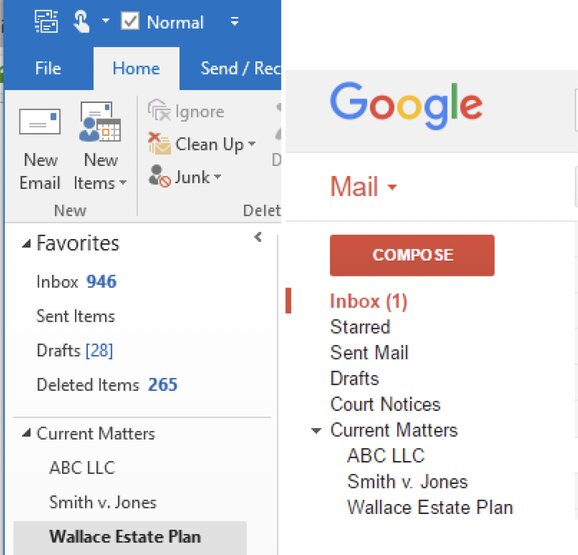
Both Gmail and Outlook can support modern business email, calendars, mobile access, offline access, signatures, attachments, and meeting workflows. The difference is mostly user preference and workflow. Outlook uses the traditional folder model that many professionals are used to. Gmail uses labels, which are more flexible because a message can appear under multiple labels.
Security and IT management
Both tools can be secure, but neither should be treated as “set it and forget it.”
Microsoft 365 offers a deep security stack across identity, devices, email, data, SaaS applications, compliance, and threat detection. Microsoft tools such as Entra ID, Conditional Access, Intune, Defender, Purview, and Secure Score can help organizations manage risk and improve their security posture.
Google Workspace takes a cloud-native approach with built-in protections for Gmail, Drive, devices, context-aware access, data loss prevention, audit logs, and admin controls. Google’s security documentation emphasizes browser-based access, automatic updates, zero trust principles, and strong protection against spam, phishing, and malware.
A 2025 Google-commissioned Hypothesis Group report found that Workspace users were more likely than Microsoft 365 users to say their platform lowered IT management costs, reduced support tickets, and helped decrease security incidents. Because this report was commissioned by Google, it should be read as useful market research, not as the only decision-making source.
AI Integration: Copilot vs Gemini
AI is now a major part of the Microsoft 365 vs Google Workspace decision.
Microsoft 365 Copilot is powerful because it connects deeply into Word, Excel, PowerPoint, Outlook, Teams, SharePoint, and Microsoft Graph. But this also makes readiness important. Before enabling Copilot broadly, organizations need to review permissions, sensitive data, overshared files, retention, endpoint controls, and identity policies.
Google Workspace brings Gemini into Gmail, Docs, Sheets, Slides, Drive, Meet, and the Gemini app. It is designed to support everyday work such as drafting emails, summarizing threads, creating content, analyzing files, searching across Drive, and assisting with meetings.
For Reputiva, the key message is this: AI readiness is really data readiness. Before turning on Copilot or Gemini widely, businesses should understand who has access to what, where sensitive data lives, and whether current sharing permissions are too open.
Cost and licensing
Google Workspace is often easier for small businesses to understand from a licensing perspective. Microsoft 365 can be more complex, but that complexity also gives organizations more options across security, endpoint management, compliance, analytics, and productivity.
The cheapest plan is not always the best plan. A low-cost license can become expensive if the organization later needs extra security tools, compliance features, storage, endpoint management, or AI controls. Businesses should compare total value, not just monthly license price.
Microsoft also commissioned Forrester Total Economic Impact™ studies that show strong ROI, productivity, security, and IT management benefits for Microsoft 365, Microsoft 365 E3/E5, and Microsoft 365 Copilot. These studies are not direct Microsoft 365 vs Google Workspace comparisons, but they are useful for understanding Microsoft’s value proposition around enterprise integration, security, endpoint management, AI readiness, and productivity.
Don’t just compare features – compare fit
The Microsoft 365 vs Google Workspace decision should be based on answering the following questions:
- Does your team work mostly in Office files or browser-based collaboration?
- Do you need advanced security, compliance, and endpoint management?
- How much IT administration capacity do you have?
- Are you planning to use Copilot, Gemini, or other AI tools?
- Are your data sharing, retention, and access controls mature enough?
Microsoft 365 is usually the better fit for organizations that need deep Office compatibility, Windows integration, complex document workflows, advanced security controls, and Microsoft ecosystem alignment.
Google Workspace is usually the better fit for organizations that prioritize simple collaboration, easy administration, strong browser-based workflows, Gmail, mobility, and cloud-native work.
Final recommendation
Do not choose Microsoft 365 or Google Workspace based only on popularity or price.
Choose based on your workflows, security requirements, compliance expectations, internal IT capacity, and AI readiness. The right productivity platform should help your people work better while reducing operational risk.
Before migrating, renewing, or enabling AI features, businesses should complete a productivity and security assessment. This helps identify licensing gaps, risky sharing settings, weak admin controls, unused features, and data governance issues.
Need help choosing or securing your productivity platform?
Reputiva helps small and medium-sized businesses assess, secure, and optimize Microsoft 365 and Google Workspace environments.
Book a consultation to review your current setup, compare your options, and build a practical roadmap for secure collaboration.