Identity has become one of the most important parts of cloud security. Identity is now considered the new security perimeter. For many small and medium-sized businesses, cloud security conversations often begin with infrastructure: virtual machines, storage, databases, networks, firewalls, and backups.
But before any of those controls can work properly, one question matters most:
Who has access?
That is why identity and access management (IAM) is central to cloud security.
Whether an organization uses Microsoft 365, Azure, Google Workspace, Google Cloud, SaaS applications, or a hybrid environment, identity is the front door. If user accounts, administrator roles, service accounts, devices, and access policies are weak, the entire environment becomes easier to compromise.
Two important identity platforms in this space are Microsoft Entra ID and Google Cloud Identity.
Both help organizations manage users, secure access, enforce authentication, connect applications, and protect company data. But they come from different ecosystems and have different strengths.
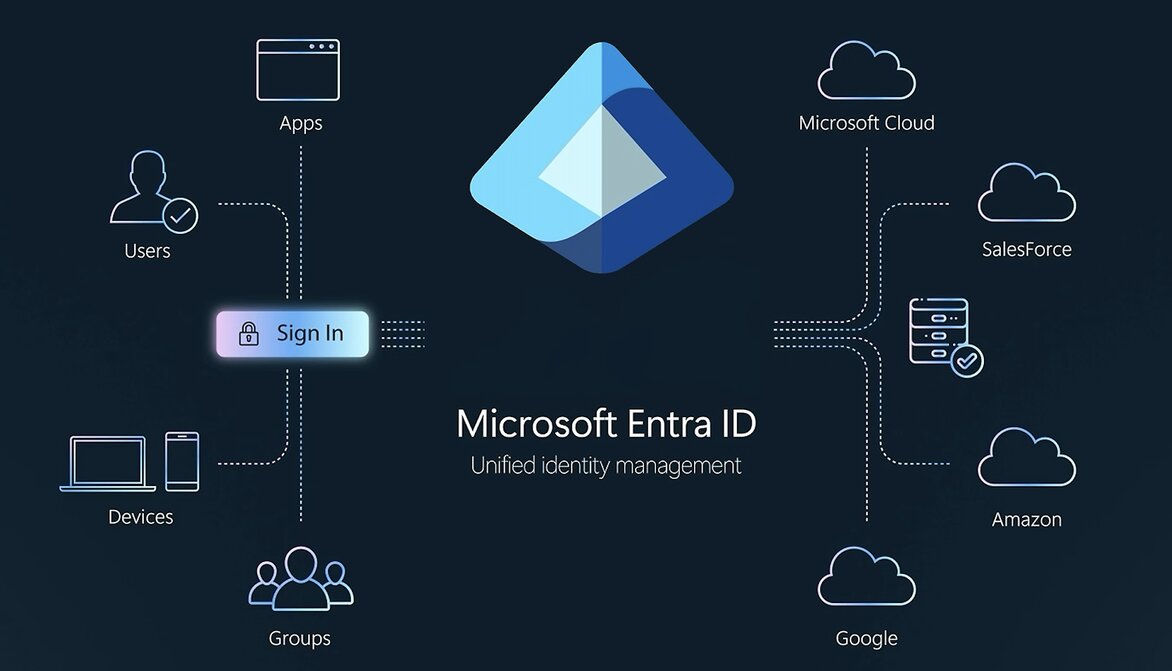
What Is Microsoft Entra ID?
Microsoft Entra ID, formerly Azure Active Directory, is Microsoft’s cloud identity and access management platform. It helps organizations manage access to Microsoft 365, Azure, SaaS applications, on-premises applications, and other cloud resources.
For SMEs already using Microsoft 365, Azure, Windows devices, Intune, Defender, or Active Directory, Entra ID is often the natural identity foundation.
Key capabilities include:
- Single sign-on
- Multi-factor authentication
- Conditional Access
- Identity Protection
- Role-based access control
- Identity Governance
- Privileged access management
- External ID for customers and partners
- Workload ID for applications and services
- Permissions Management for multicloud environments
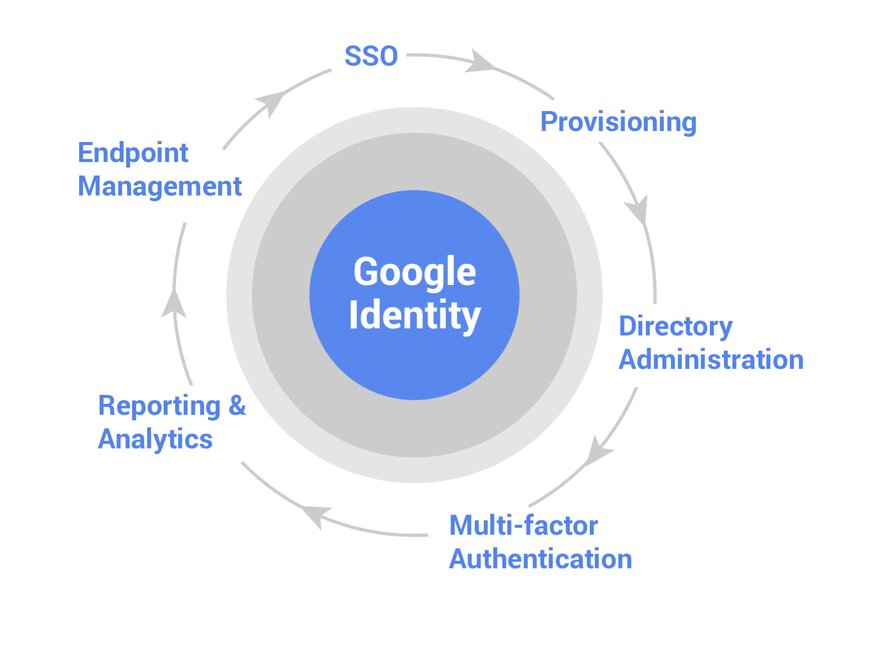
What Is Google Cloud Identity?
Google Cloud Identity is Google’s identity, access, app, and endpoint management platform. It helps organizations manage users, secure access to SaaS apps, enforce MFA, manage devices, investigate threats, and connect identity across Google Workspace, Google Cloud, and third-party applications.
For SMEs already using Google Workspace, Gmail, Google Drive, Google Cloud, Chrome, Android, or Chromebooks, Cloud Identity is often the natural identity foundation.
Key capabilities include:
- Single sign-on
- Multi-factor authentication
- Directory administration
- User provisioning
- Endpoint management
- Context-Aware Access
- Account takeover protection
- Reporting and analytics
- Security Center
- Secure LDAP
- Directory Sync
Why This Matters for SMEs
SMEs often have lean IT teams. One person may be responsible for email, cloud access, SaaS apps, laptops, onboarding, offboarding, and security. This creates risk.
Former employees may still have access. Contractors may remain active. Admin accounts may lack strong MFA. Guest users may not be reviewed. Devices may be unmanaged. SaaS apps may be connected without proper approval. Workload identities may be forgotten.
A practical identity platform should help answer:
- Who has access?
- Are admins protected?
- Is MFA enforced?
- Are risky sign-ins monitored?
- Are users removed when they leave?
- Are devices trusted?
- Are SaaS apps centrally managed?
- Are cloud permissions reviewed?
- Are workload identities secured?
Microsoft Entra ID vs Google Cloud Identity
| Area | Microsoft Entra ID | Google Cloud Identity |
|---|---|---|
| Best fit | Microsoft 365, Azure, Windows, Intune, Defender | Google Workspace, Google Cloud, Chrome, Android |
| Access control | Conditional Access | Context-Aware Access |
| MFA | Microsoft Authenticator, FIDO2, certificate-based auth, passwordless | 2-Step Verification, Google Authenticator, Titan Security Keys |
| Risk detection | Entra ID Protection, risky users, risky sign-ins | Suspicious login detection, account takeover protection |
| Governance | Strong identity governance, access reviews, lifecycle workflows | Directory admin, provisioning, organizational units, reporting |
| Endpoint management | Strong integration with Intune | Built-in endpoint management for Google-first environments |
| Workload identity | Microsoft Entra Workload ID | Google Cloud service accounts and Workload Identity Federation |
| Multicloud | Stronger multicloud permissions visibility through Entra Permissions Management | Strongest inside Google Workspace and Google Cloud |
Where Microsoft Entra ID Is Strong
Microsoft Entra ID is especially strong for Microsoft-first organizations.
If an SME already uses Microsoft 365, Azure, Windows, Intune, Defender, or Active Directory, Entra ID provides a strong identity foundation.
Its biggest strengths include:
- Conditional Access for adaptive security policies
- Identity Protection for risky sign-ins and compromised accounts
- Strong Microsoft 365 and Azure integration
- Identity Governance for access reviews and lifecycle workflows
- Privileged access controls
- Workload identity protection
- Multicloud permissions visibility through Entra Permissions Management
For SMEs that need stronger governance, hybrid identity, administrator controls, and Microsoft security integration, Entra ID is usually the better fit.
Where Google Cloud Identity Is Strong
Google Cloud Identity is especially strong for Google-first organizations. If an SME already uses Google Workspace, Gmail, Drive, Google Cloud, Chrome, Android, or Chromebooks, Cloud Identity provides a simple and effective identity foundation.
Its biggest strengths include:
- Simple user and app management through the Google Admin console
- SSO for SaaS applications
- Strong MFA and security key support
- Context-Aware Access
- Endpoint management
- Suspicious login detection
- Account takeover protection
- Integration with Google Workspace and Google Cloud
For SMEs that want simplicity, Google-native controls, endpoint management, and BeyondCorp-style access, Google Cloud Identity is usually the better fit.
Conditional Access vs Context-Aware Access
Microsoft Entra ID uses Conditional Access to enforce adaptive access policies based on signals such as user, device, location, application, risk, and authentication strength.
Google Cloud Identity uses Context-Aware Access to control access based on identity and context, such as user, device state, location, and access conditions.
Both support Zero Trust thinking.
Which One Should SMEs Choose?
Choose Microsoft Entra ID if:
- Your business runs mainly on Microsoft 365
- You use Azure
- You manage Windows devices
- You use Intune, Defender, Sentinel, or Purview
- You have hybrid Active Directory
- You need advanced Conditional Access
- You need access reviews and identity governance
- You need multicloud permissions visibility
Choose Google Cloud Identity if:
- Your business runs mainly on Google Workspace
- You use Google Cloud
- You manage Chrome, Android, or Chromebook devices
- You want simple identity and endpoint management
- You want SSO for SaaS apps through Google
- You want Context-Aware Access
- You want strong security key adoption
- You prefer Google-native administration
Identity is the control plane of Cloud Security
At Reputiva, we believe identity is the control plane of cloud security. Before an organization asks whether its cloud storage, databases, virtual machines, SaaS apps, or AI workloads are secure, it should ask:
Who can access them, under what conditions, from which devices, and with what level of privilege?
Microsoft Entra ID and Google Cloud Identity can both help SMEs improve identity security. The right choice depends on the organization’s ecosystem, risk profile, and operating reality.
For Microsoft-first businesses, Entra ID provides strong Conditional Access, identity governance, privileged access, workload identity, and Microsoft security integration.
For Google-first businesses, Cloud Identity provides strong SSO, MFA, endpoint management, Context-Aware Access, Google Workspace security, and Google Cloud integration.
The goal is not to adopt every feature at once. The goal is to build a practical identity security baseline:
- Enforce MFA
- Protect administrators
- Review privileged access
- Remove stale accounts
- Secure devices
- Centralize SSO
- Monitor risky sign-ins
- Review external users
- Manage workload identities
- Document onboarding and offboarding
Get a clear view of your Identity Security Posture
Is your organization using Microsoft Entra ID, Google Cloud Identity, or both without a clear understanding of identity risks? Reputiva helps SMEs assess identity and cloud environments, identify access gaps, reduce excessive permissions, and build practical remediation roadmaps.
Book a consultation for an Identity and Cloud Security Assessment with Reputiva to understand your current risks and take the next step toward a more secure cloud environment.
References & Further Reading