Cloud governance is not about slowing teams down. It is about giving teams the structure, visibility, and guardrails they need to move faster without losing control.
Microsoft Azure workloads require governance controls to help teams organize subscriptions, enforce policies, manage access, monitor resources, control spending, standardize deployments, protect critical assets, support compliance, and improve operations.
The better question is not simply:
Which Azure governance service should we use?
The better question is:
What are we trying to govern: subscriptions, access, policies, resources, costs, infrastructure deployments, compliance, security posture, or operations?
Why Azure cloud governance service decisions matter
Governance decisions shape how Azure environments are organized, secured, monitored, operated, and improved over time.
The wrong governance model can create inconsistent subscriptions, unclear ownership, excessive access, weak audit trails, manual deployments, untagged resources, unexpected costs, and shadow IT.
The right governance model supports:
- Subscription hierarchy
- Management group design
- Access governance
- Policy enforcement
- Resource visibility
- Audit readiness
- Cost governance
- Infrastructure automation
- Landing zones
- Security posture governance
- Compliance alignment
- Operational visibility
- Hybrid governance
- Multi-subscription growth
Microsoft’s Azure governance documentation groups core governance capabilities around services such as Azure Policy, management groups, Azure Resource Graph, and Cost Management. These services help teams organize, control, query, and optimize Azure environments as they grow.
Start with the governance outcome, not the service name
A common mistake is choosing governance services because they sound mature.
But governance services should be selected based on the operating problem the organization is trying to solve.
Before choosing a Microsoft Azure governance service, ask:
- Are we trying to organize subscriptions across teams or environments?
- Are we trying to enforce policies and guardrails?
- Are we trying to govern who has access to what?
- Are we trying to inventory resources and understand what exists?
- Are we trying to collect audit evidence?
- Are we trying to control cloud spend?
- Are we trying to standardize infrastructure deployment?
- Are we trying to protect critical resources from accidental deletion?
- Are we trying to implement a landing zone?
- Are we trying to govern security posture?
- Are we trying to extend governance to hybrid or multicloud resources?
- What governance controls can our team realistically operate?
The best Azure governance decision starts with the cloud operating model, not the tool.
Main Microsoft Azure cloud governance service options
| Governance Need | Microsoft Azure Service |
|---|---|
| Subscription hierarchy and governance at scale | Azure Management Groups |
| Preventive and compliance governance | Azure Policy |
| Access governance | Azure RBAC |
| Identity foundation and governance | Microsoft Entra ID |
| Resource organization and control plane governance | Azure Resource Manager |
| Resource visibility and governance queries | Azure Resource Graph |
| Governance audit trail | Azure Activity Log |
| Operational governance and monitoring visibility | Azure Monitor / Log Analytics |
| Cost governance and FinOps visibility | Microsoft Cost Management / Budgets |
| Resource classification and cost allocation | Tags |
| Infrastructure as code and repeatable provisioning | ARM Templates / Bicep / Template Specs |
| Lifecycle management and controlled deployment grouping | Azure Deployment Stacks |
| Enterprise-scale governance and cloud operating model | Azure Landing Zones |
| Security posture governance | Microsoft Defender for Cloud |
| Operational, cost, reliability, and performance recommendations | Azure Advisor |
| Accidental deletion or modification protection | Resource Locks |
| Hybrid and multicloud governance extension | Azure Arc |
Azure Management Groups: subscription hierarchy and governance at scale
Azure management groups are high-level containers that organize and govern multiple Azure subscriptions.
Use Azure Management Groups when the workload needs: multiple Azure subscriptions, subscription hierarchy, policy assignment at scale, governance across business units, environment separation, production and non-production boundaries, centralized compliance controls and enterprise-scale organization.
Azure Policy: preventive and compliance governance
Azure Policy is a native Microsoft Azure service for creating, assigning, and managing rules that enforce corporate standards and assess compliance at scale.
Use Azure Policy when the workload needs: policy enforcement, resource consistency, regulatory compliance, security baselines, cost controls, required tags, allowed locations, allowed resource types, configuration compliance and drift prevention.
Azure RBAC: access governance
Azure RBAC is an authorization system built on Azure Resource Manager that provides fine-grained access management to Azure resources. Azure Role-Based Access Control governs who can do what across Azure resources.
Use Azure RBAC when the workload needs: subscription-level permissions, resource group access control, resource-level access, built-in roles, custom roles, least privilege, separation of duties, delegated administration.
Microsoft Entra ID: identity foundation and governance
Microsoft Entra ID, formerly Azure Active Directory, is Microsoft’s cloud identity and access management solution that prevents identity attacks, secures access across cloud and on-premises apps and resources for any user on any device. Microsoft Entra ID is the identity foundation for Azure governance.
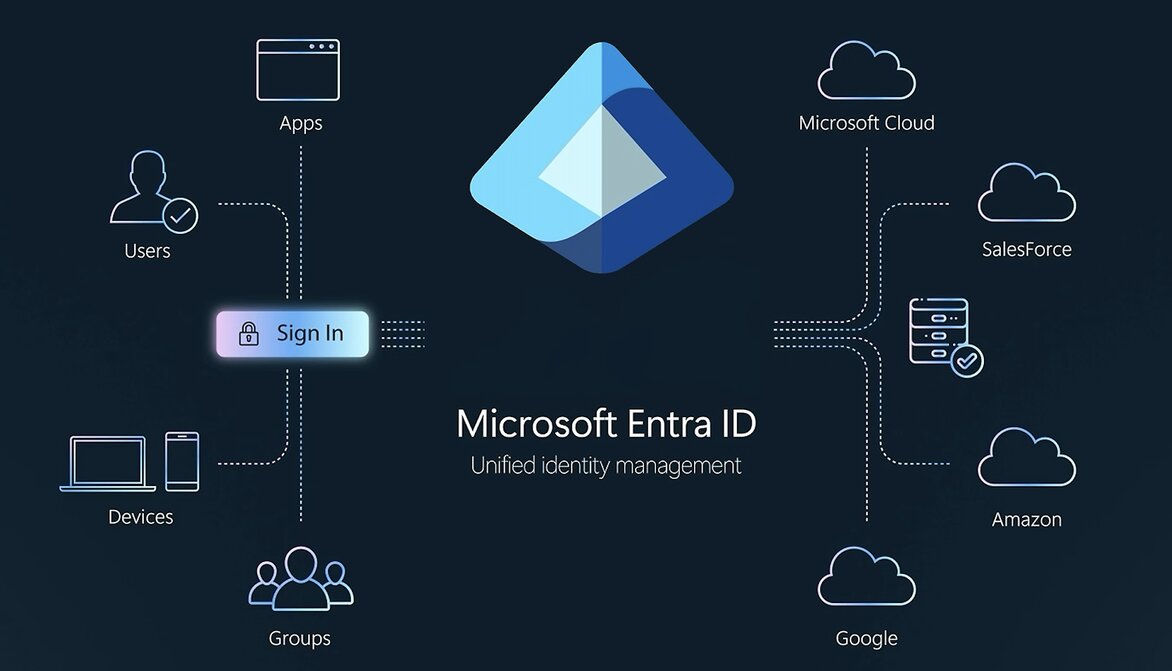
Use Microsoft Entra ID when the workload needs: user and group identity, workforce access, authentication, MFA, conditional Access, privileged access governance, external user governance and identity lifecycle alignment.
Azure Resource Manager: resource organization and control plane governance
Azure Resource Manager is the deployment and management service for Azure. It is the control plane for deploying and managing Azure resources.
Use Azure Resource Manager when the workload needs: resource groups, resource deployment, resource lifecycle management, resource provider control, consistent deployment model, tags, locks, role assignment scopes, and policy assignment scopes.
Azure Resource Graph: resource visibility and governance queries
Azure Resource Graph is an Azure management service that lets you run fast, large-scale queries across multiple subscriptions and management groups. Azure Resource Graph helps query resources across Azure environments at scale.
Use Azure Resource Graph when the workload needs: resource inventory, cross-subscription queries, asset discovery, compliance reporting, tag analysis, configuration visibility, governance dashboards, change and drift investigation.
Azure Activity Log: governance audit trail
The Azure Activity Log is a subscription-level platform log that tracks control-plane operations for your Azure resources. It answers the “who, what, and when” for actions like creating, updating, or deleting resources (e.g., starting a VM or changing a policy).
Azure Activity Log provides visibility into subscription-level events and administrative operations.
Use Azure Activity Log when the workload needs: subscription activity visibility, control plane audit trail, resource change tracking, administrative activity monitoring, investigation support, compliance evidence and operational accountability.
Azure Monitor and Log Analytics: operational governance and visibility
Azure Monitor and Log Analytics support governance by making operational behaviour visible.
Use Azure Monitor and Log Analytics when the workload needs logs. metrics, alerts, dashboards, operational visibility, compliance monitoring, centralized log queries and governance signals.
Microsoft Cost Management and Budgets: cost governance and FinOps visibility
Microsoft Cost Management is a free native toolset in the Microsoft 365 admin center that helps you analyze, monitor, and optimize cloud spending.
Use Microsoft Cost Management and Budgets when the workload needs: budget alerts, cost visibility, forecasting, spend tracking, cost allocation, subscription-level cost review, tag-based cost reporting and FinOps governance.
Tags: resource classification, ownership, and cost allocation
Tags are metadata elements that you apply to your Azure resources. Tags make Azure resources more understandable and governable.
Use tags when the workload needs: resource ownership, cost allocation, environment classification, application mapping, compliance grouping, automation targeting, reporting and lifecycle management
ARM Templates, Bicep, and Template Specs: infrastructure as code and repeatable provisioning
ARM templates, Bicep, and Template Specs help standardize Azure resource deployments.
Use ARM, Bicep, or Template Specs when the workload needs: repeatable deployment, infrastructure as code, reviewable infrastructure changes, standardized environments, deployment consistency, versioned templates, approved deployment patterns and reduced manual portal changes.
Azure Deployment Stacks: lifecycle management and controlled deployment grouping
Azure Deployment Stacks can help manage a collection of Azure resources as a single deployment unit.
Use Deployment Stacks when the workload needs: a grouped deployment lifecycle, resource lifecycle control, deny-assignment enforcement, managed resource collections, template-based governance, replacement for some blueprint-like patterns.
Azure Landing Zones: enterprise-scale governance and cloud operating model
Azure Landing Zones provide a reference architecture and operating model for governed Azure environments.
Use Azure Landing Zones when the workload needs: subscription structure, management group hierarchy, identity baseline, network baseline, security baseline, policy baseline, logging baseline, platform and workload separation, and scalable cloud operating model.
Microsoft Defender for Cloud: security posture governance
Microsoft Defender for Cloud is a Cloud Native Application Protection Platform (CNAPP). It unifies security posture management and threat protection for multi-cloud (Azure, AWS, GCP) and hybrid environments, covering workloads, services, and DevOps workflows from code to cloud.
Use Defender for Cloud when the workload needs: security posture visibility, secure score, security recommendations, regulatory compliance visibility, workload protection visibility, misconfiguration detection and risk prioritization.
Azure Advisor: operational, cost, reliability, and performance recommendations
Azure Advisor is a free personalized cloud consultant that analyzes your resource configurations and usage telemetry. Azure Advisor helps identify optimization opportunities across workloads.
Use Azure Advisor when the workload needs cost optimization, operational excellence, reliability, security, performance, and improvement planning recommendations.
Resource Locks: accidental deletion or modification protection
Resource Locks help protect critical Azure resources from accidental deletion or modification.
Use Resource Locks when the workload needs: delete protection, change protection, critical resource safeguards, production workload protection, administrative guardrails and risk reduction for key resources
Azure Arc: hybrid and multicloud governance extension
Azure Arc extends Azure management and governance capabilities to hybrid and multicloud resources. Azure Arc is a hybrid and multi-cloud management tool that extends Microsoft Azure to run across on-premises data centers, edge locations, and other clouds.
Use Azure Arc when the workload needs: governance beyond Azure, hybrid server management, Kubernetes governance, policy extension to non-Azure resources, centralized inventory, cross-environment visibility and consistent operations across environments
Common pitfalls when choosing Azure governance services
1. Treating governance as bureaucracy
Good governance should help teams move faster safely, not block every decision. If governance only creates delay, teams will work around it
2. Using Azure Policy without testing impact
Strong policies are useful, but poorly tested policies can block valid deployments. Policies should be planned, tested, and communicated.
3. Assigning broad RBAC roles too high in the hierarchy
Broad Owner or Contributor access at the management group or subscription level can scale risk quickly. Access governance should be tied to least privilege, scope, and review cycles.
4. Not knowing what resources exist
Azure Resource Graph becomes important when teams can no longer track resources manually. You cannot govern what you cannot see.
5. Treating cost governance as an afterthought
Cost Management, budgets, tags, reports, and ownership should be introduced early. Cloud governance without cost governance is incomplete.
6. Separating governance from security posture
Azure Policy, Defender for Cloud, Entra ID, RBAC, Monitor, Activity Log, Resource Graph, and Cost Management should work together. Governance is stronger when structure, access, visibility, security posture, and cost accountability are connected.
Governance choices should follow the cloud operating model
For SMEs, the best Azure governance decision is not to enable every governance service immediately. It is to understand the cloud operating model and choose the right controls for how the organization actually works.
The wrong governance model creates bottlenecks, shadow IT, inconsistent subscriptions, unclear ownership, audit gaps, and uncontrolled spend.
The right governance model creates guardrails, visibility, accountability, repeatability, and safer cloud growth.
Practical next step
Before choosing an Azure cloud governance service, create a cloud governance profile.
Include:
- Number of subscriptions
- Management group structure
- Workload criticality
- Team ownership model
- Environment separation needs
- Security and compliance requirements
- IAM and RBAC governance requirements
- Logging and audit requirements
- Resource visibility needs
- Infrastructure provisioning model
- Deployment governance needs
- Landing zone requirements
- Critical resource protection needs
- Hybrid or multicloud governance needs
- Cost visibility and budget requirements
- Tagging standards
- Incident response and ownership model
- Team operating capacity
This makes Azure governance decisions practical, risk-based, and aligned with how the organization actually operates.
Need help choosing the right Microsoft Azure cloud governance service?
Reputiva helps organizations assess, secure, modernize, and optimize cloud environments across AWS, Azure, and GCP.
Book a consultation with Reputiva to assess your cloud readiness, governance strategy, security posture, or modernization roadmap.