Choosing the right Microsoft 365 enterprise license is no longer just an IT procurement decision. For enterprise organizations, Microsoft 365 sits at the center of productivity, identity, endpoint management, collaboration, data protection, compliance, cybersecurity, and AI readiness.
The plan names may look similar, but each license provides a different level of control, governance, analytics, security, and compliance capability. Microsoft notes that enterprise plan options offer greater levels of compliance and security management than business plans and are designed for enterprise customers and organizations with more than 300 users. For large organizations, the right Microsoft 365 licensing strategy is not about giving everyone the most expensive plan. It is about matching licenses to user roles, business risk, regulatory requirements, device exposure, data sensitivity, and operational needs.
This guide explains how enterprise organizations can think about Microsoft 365 licensing and choose the right plan for their workforce.
What Is a Microsoft 365 Enterprise License?
A Microsoft 365 enterprise license is a user-based subscription that provides access to Microsoft productivity apps, cloud services, identity and access management, endpoint management, security, compliance, collaboration, and analytics capabilities. Depending on the plan, Microsoft 365 Enterprise can include desktop, web, and mobile Office apps, 1 TB to 5+ TB of cloud storage per user, Microsoft Teams, Windows for Enterprise, advanced identity and access management, security controls, analytics, and compliance features.
Microsoft 365 is a cloud-powered subscription service from Microsoft that includes premium productivity apps (Word, Excel, PowerPoint, Outlook), intelligent cloud services, advanced security, and OneDrive cloud storage. Formerly known as Office 365, it provides continuously updated software that is accessible on desktops, the web, and mobile devices.
Recommended Microsoft 365 Enterprise Licensing Strategy
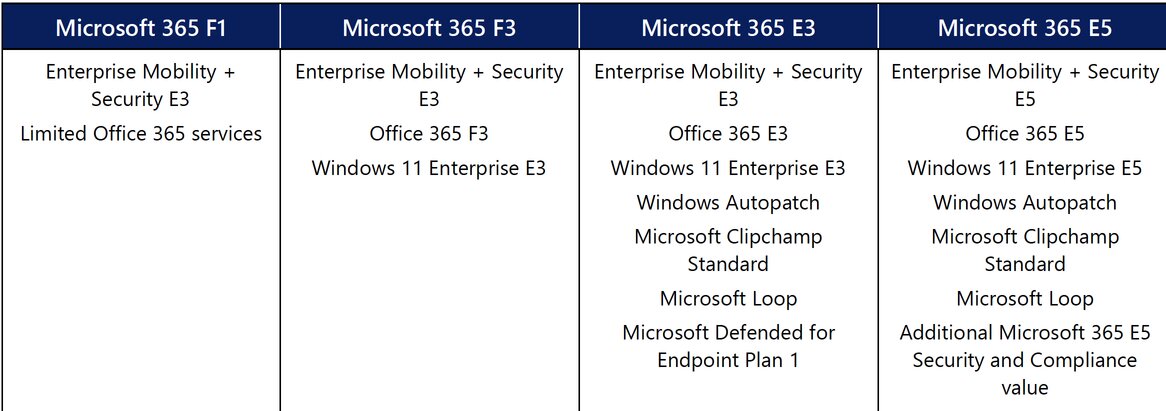
Microsoft 365 is available in two options for Information (knowledge) Workers (IW), E3 and E5 and two options for Firstline Workers (FLW), F1 and F3.
For knowledge workers: Microsoft 365 E3
Microsoft 365 E3 is often a strong baseline for enterprise knowledge workers who need full productivity apps, enterprise-grade identity, device management, information protection, and Windows Enterprise capabilities. Includes identity and access management; powerful desktop, web, and mobile productivity apps, including Microsoft Teams; and basic security, cloud storage, and web-connected AI chat.
Microsoft 365 E3 gives IT and security teams more control than business plans, while avoiding the cost of assigning E5 to every user.
For high-risk and regulated users: Microsoft 365 E5
Microsoft 365 E5 provides best-in-class productivity apps with advanced enterprise analytics and data protection. Microsoft 365 E5 is better suited for users and departments that require advanced security, compliance, analytics, and threat protection. Includes unified endpoint, identity, and access management, advanced security and analytics, cloud storage, and web-connected AI chat.
For most enterprises, E5 should be applied strategically to high-risk users rather than automatically assigned across the whole organization.
E5 is especially relevant for users handling sensitive data, regulated business units, users with privileged access, security teams, finance teams, legal and compliance teams, HR teams and teams requiring advanced threat protection and compliance tooling.
For AI-first Enterprises: Microsoft 365 E7 – The Frontier Suite
Microsoft 365 E7 is designed for organizations moving beyond traditional productivity and security into AI-enabled, agent-operated enterprise workflows. It builds on the Microsoft 365 enterprise foundation by adding Agent 365, advanced identity, network access, and security capabilities.
Microsoft 365 E7 brings together:
- Microsoft 365 E5 – Provides the core productivity, security, identity, and compliance foundation required to run work securely at enterprise scale.
- Microsoft Entra Suite – Enables secure employee use of all apps and AI by enforcing continuous, adaptive identity and network access controls.
- Microsoft 365 Copilot – Your AI for work, grounded in the knowledge of Work IQ, that puts intelligence directly into apps and workflows you use every day.
- Agent 365 – The control plane for AI agents, enabling organizations to centrally manage, govern, and secure agents by extending existing Microsoft 365 security, identity, and compliance controls.
For Frontline Workers: Microsoft 365 F license Plans
Microsoft’s frontline worker (FLW) licenses are cost-effective subscriptions tailored for employees who don’t have dedicated office desks. These include retail associates, Customer service teams, healthcare support teams, and manufacturing or field workers.
The Microsoft 365 F1 license is designed for frontline employees who need access to essential tools without the full desktop Office suite. It is the most cost-effective option, offering core communication and collaboration capabilities. Choose Microsoft 365 F1 when the worker mostly needs secure access, communication, and lightweight digital tools.
F1 offers only read-only access to web apps and includes no email mailbox
F3 provides read/write mobile app access and a 2 GB Exchange mailbox. Choose Microsoft 365 F3 when the worker needs to actively create, edit, collaborate, use email, manage tasks, or work more like a mobile knowledge worker.
Frontline Workers are cost-effective subscriptions tailored for employees who don’t have dedicated office desks.
For productivity-only Enterprise users: Office 365 E1, E3, or E5
Some organizations may separate productivity licensing from broader Microsoft 365 licensing. Office 365 enterprise plans are still available, including Office 365 E1, E3, and E5. These plans may be relevant when an organization already uses separate tools for endpoint management, security, compliance, or identity, but still wants Microsoft productivity and collaboration capabilities.
Office 365 is a suite of productivity apps (Word, Excel, Teams), while Microsoft 365 is a comprehensive bundle that includes those same Office apps plus Windows OS upgrades, advanced cybersecurity (Microsoft Defender), and device management tools.
Office 365 E3 is a cloud-based suite of productivity apps and services with information protection and compliance capabilities included.
Office 365 E5 is a cloud-based suite that includes and builds on Office 365 E3 with advanced voice, analytics, security, and compliance services.
Special Consideration: Microsoft 365 E3/E5 Nonprofit Staff Pricing
For nonprofit organizations, Microsoft 365 licensing should be reviewed differently from standard enterprise pricing. Eligible nonprofits may qualify for Microsoft 365 nonprofit grants and discounted staff pricing, including Microsoft 365 E3 and E5 nonprofit staff plans. Microsoft 365 E3 Nonprofit Staff Pricing may be a strong fit for nonprofit staff who need enterprise productivity, collaboration, identity, device management, and baseline security controls.
For many nonprofits, a practical model could include:
- Microsoft 365 Business Basic grant for eligible smaller nonprofit users, where appropriate
- Microsoft 365 Business Premium Nonprofit Staff Pricing for smaller nonprofits that need stronger security and device management
- Microsoft 365 F3 Nonprofit Staff Pricing for field staff and frontline workers
- Microsoft 365 E3 Nonprofit Staff Pricing for core staff and knowledge workers
- Microsoft 365 E5 Nonprofit Staff Pricing for high-risk, privileged, or compliance-sensitive users
A Practical Enterprise Licensing Model
A balanced Microsoft 365 enterprise licensing model may look like this:
Microsoft 365 E3
For most knowledge workers who need full productivity, collaboration, device management, identity protection, and enterprise controls.
Microsoft 365 E5
For executives, administrators, security teams, compliance teams, and users handling sensitive or regulated data.
Microsoft 365 E7
For AI-first organizations and advanced users that need Agent 365, stronger AI governance, advanced identity, security, and agent-ready enterprise controls.
Microsoft 365 F Plans
For frontline workers who need secure, lightweight access to communication and collaboration tools.
Common Microsoft 365 Enterprise Licensing Mistakes
1. Giving Everyone the Same License
One of the most expensive mistakes enterprises make is assigning the same license to every user. Not every employee has the same productivity needs, security exposure, compliance requirements, or device profile.
2. Treating Licensing as Procurement Instead of Architecture
Microsoft 365 licensing affects identity, endpoint management, collaboration, data protection, compliance, security operations, and AI adoption. It should be reviewed as part of enterprise architecture, not just as a renewal exercise.
3. Underestimating Security and Compliance Requirements
Enterprises often discover too late that the license they selected does not include the security, compliance, data protection, or investigation features required by their risk environment.
4. Not Reviewing Admin and Privileged User Licensing
Administrators and privileged users represent a higher risk. These accounts often need stronger identity controls, monitoring, auditing, and threat protection. Licensing decisions should reflect the elevated risk of these roles.
5. Paying for Features Without Operationalizing Them
Many enterprises pay for advanced Microsoft 365 features but do not fully configure or operationalize them. Licensing value comes from deployment, governance, monitoring, and adoption, not just purchase.
Microsoft 365 Licensing is a security, governance, and AI readiness decision
At Reputiva, we believe Microsoft 365 enterprise licensing should be treated as a strategic decision regarding cloud, security, and governance. A well-designed licensing model helps organizations align users, roles, data, devices, security controls, compliance obligations, and AI readiness. It also helps reduce waste by ensuring that premium licenses are assigned where they deliver the most value.
For enterprise organizations, the goal is not simply to choose between E3 and E5. The goal is to build a licensing architecture that supports secure collaboration, identity protection, endpoint visibility, data governance, compliance, and responsible AI adoption.
Need Help Reviewing Your Microsoft 365 Enterprise Licensing?
Reputiva helps organizations assess Microsoft 365 licensing, identity security, endpoint management, data protection, compliance readiness, and Microsoft 365 Copilot readiness.
Whether you are renewing your enterprise agreement, reviewing E3 vs. E5, preparing for Copilot, or trying to reduce licensing waste, we can help you build a Microsoft 365 licensing strategy that supports your business, security, and governance goals.
Book a Microsoft 365 Enterprise Licensing & Security Assessment today.